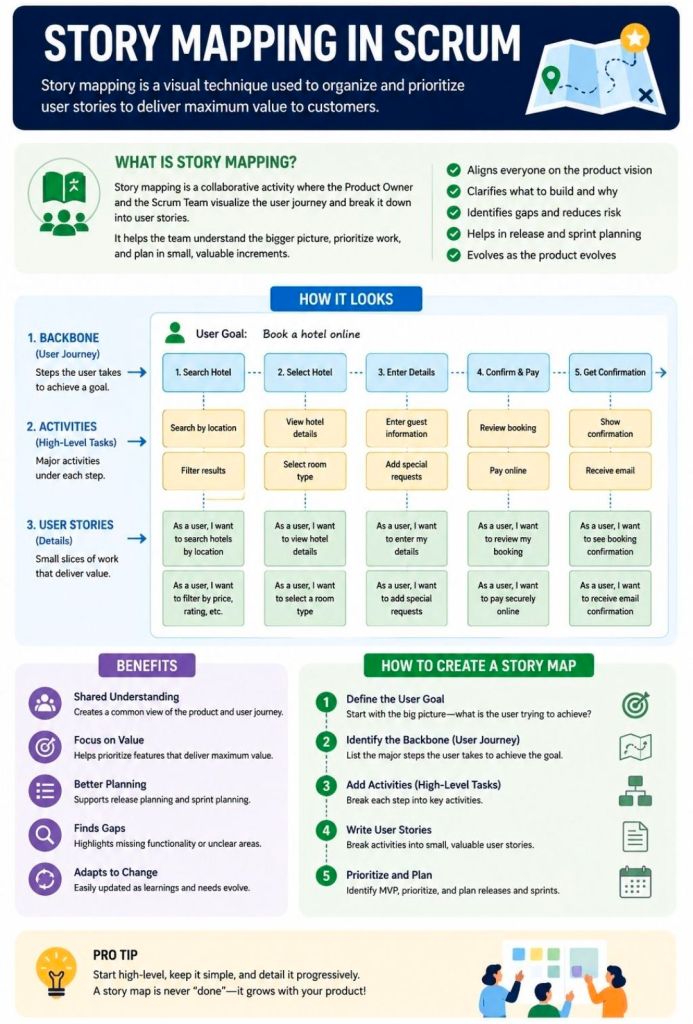
Story Mapping in Agile and Scrum is a visual technique that organizes user stories along a chronological user journey. It helps teams see the big picture, avoid flat, disconnected backlogs, and collaborate on planning iterative releases that consistently deliver user value.
How a Story Map is Structured
A story map is a two-dimensional grid—often built with sticky notes on a whiteboard or via software like Miro or Visual Paradigm. It breaks work down into three levels of hierarchy:
Horizontal Axis (The Spine): Arranges the customer journey chronologically.
Activities: The broadest goals a user wants to achieve (e.g., “Checkout”).
Steps: The specific tasks required to complete the activity (e.g., “Enter Shipping Info,” “Pay”).
Vertical Axis (Details & Priority): Stacks beneath each step are the detailed user stories, epics, or features. They are organized by priority, with the most critical or highly sophisticated tasks at the top.
The Benefits of Story Mapping
Teams use this technique—popularized by Jeff Patton—to achieve several core Agile goals:
Prevents “Flat Backlog” Blindness: Gives stakeholders and developers a birds-eye view of how the entire application or feature fits together.
Defines the MVP: Allows teams to draw horizontal “release lines” across the map. The items sitting above this line form the barebones “walking skeleton” or Minimum Viable Product (MVP).
Aids Sprint Planning: Helps the Product Owner pull well-sequenced, context-aware stories directly into sprint backlogs.
Fosters Collaboration: Moves the team away from siloed requirement docs and toward collaborative conversations around actual user behavior.
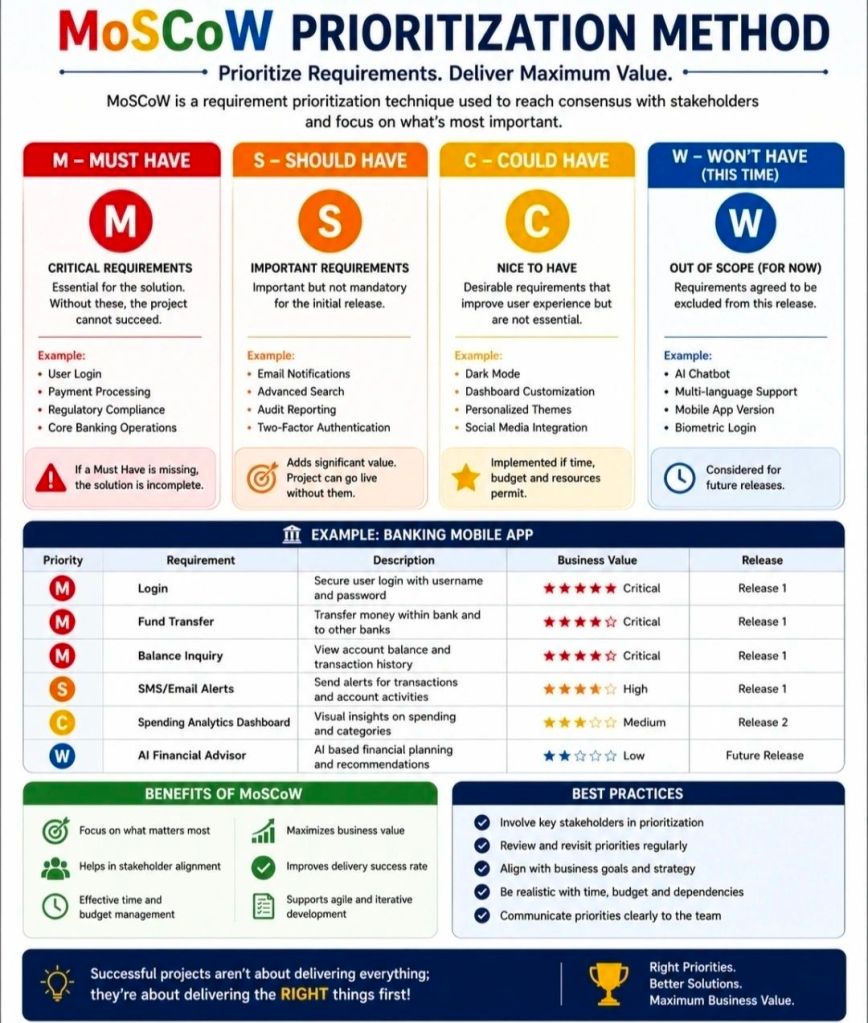
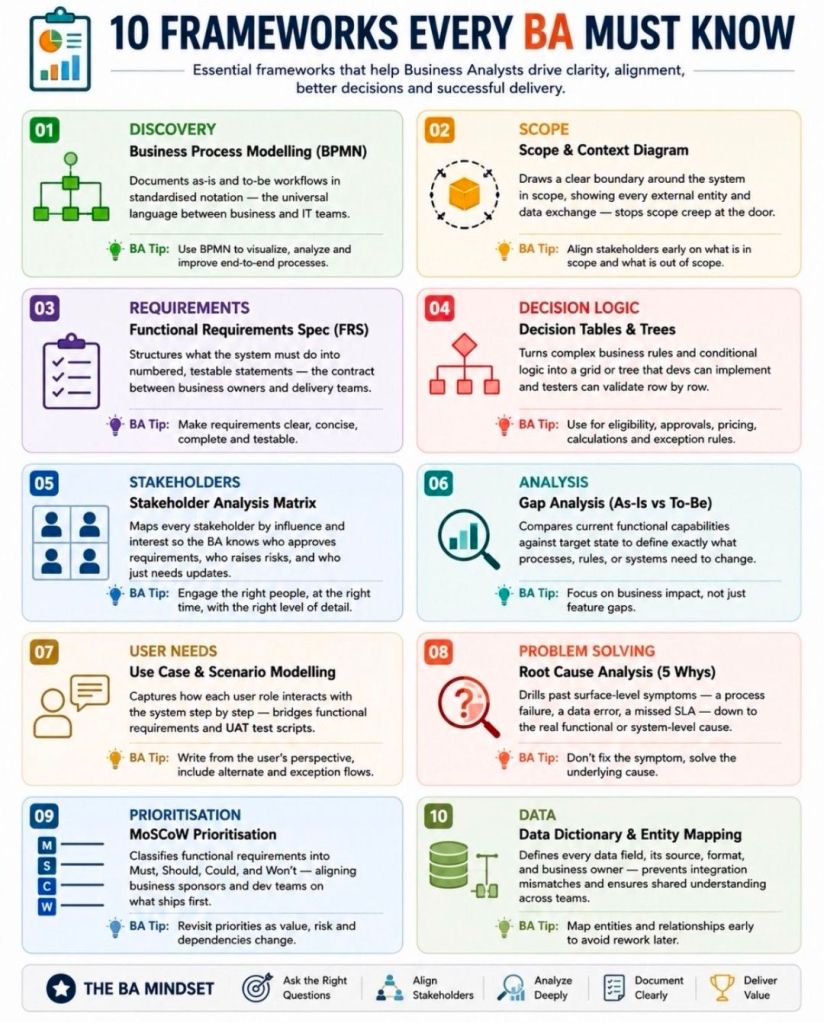
The MoSCoW method is a popular requirements prioritization technique used in project management and software development to help stakeholders reach a common understanding on the importance of deliverables. It categorizes tasks into Must, Should, Could, and Won’t have.
The MoSCoW Categories
Must Have: Non-negotiable requirements that are critical for success, compliance, or safety. Without these, the project is considered a failure and cannot be deployed.
Should Have: High-priority, important features that add significant value but are not strictly vital for immediate delivery. These are generally included if time permits, or they may have a manual workaround.
Could Have: Desirable, “nice-to-have” features that are small and easy to implement. These improve user experience but can be deferred or dropped without impacting the project’s overall success.
Won’t Have (or Won’t Have this time): Features that have been mutually agreed upon as out-of-scope for the current release or timeframe. They are deliberately excluded to prevent scope creep, though they may be added to the backlog for future cycles.
Why and When to Use It
Resource Management: It helps maximize limited time, budget, and resources by focusing effort on the features that provide the most immediate ROI.
Stakeholder Alignment: It acts as a negotiation tool, forcing stakeholders to agree on what is genuinely critical versus what is purely desirable.
Agile Environments: It is a foundational practice in Agile frameworks like DSDM, where teams adhere to fixed deadlines (timeboxes) and adjust the project scope instead.
Best Practices for Implementation
The 60-20-20 Rule: A common best practice is to ensure that Must Haves consume no more than 60% of the team’s total effort. Roughly 20% should be allocated to Should Haves, and 20% reserved for Could Haves to act as contingency room.
Challenge Assumptions: When classifying a requirement as a Must, ask: “What happens if we don’t do this? Can we still deploy the product?” If the project can still function—even awkwardly—it is likely a Should or Could.
Continuous Review: Priorities aren’t static. Re-evaluate your MoSCoW list at the end of every sprint or development cycle, as a Could Have from a previous phase might be upgraded or permanently discarded.
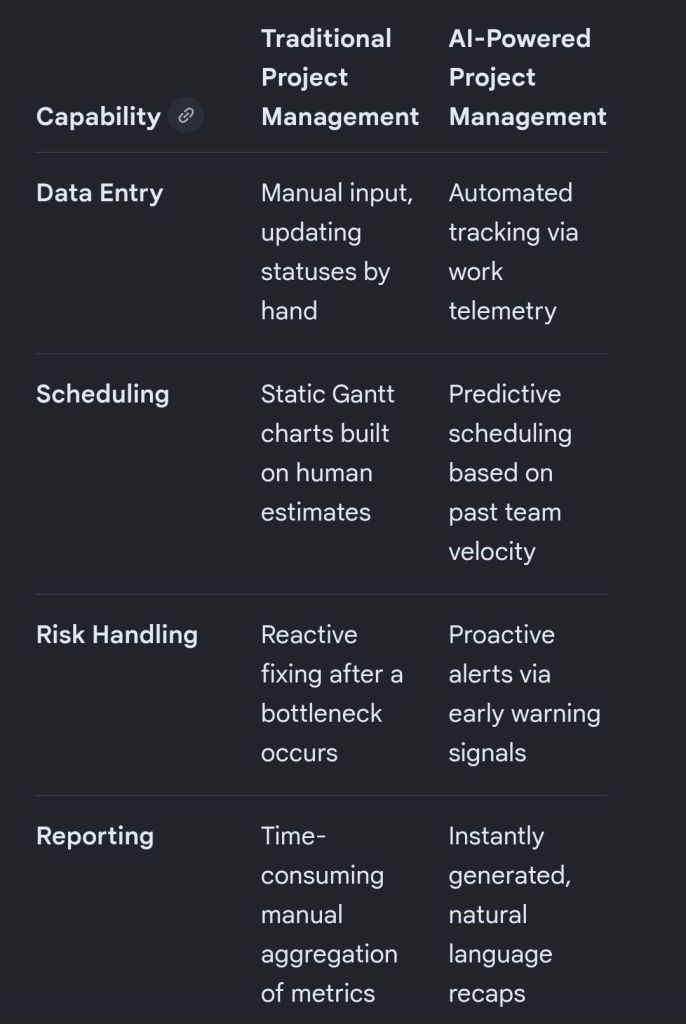
Artificial intelligence is transforming project management by shifting software from passive data repositories into active, predictive engines that automate tedious administration and improve decision accuracy.
The breakdown below covers the primary AI approaches and the specific tools driving each function.
🧠 Core AI Approaches in Project Management
Rather than basic, rule-based automation (“if X happens, do Y”), true AI uses model-driven machine learning, natural language processing (NLP), and predictive analytics.
Predictive Analytics & Forecasting: Machine learning models evaluate past team velocity, budget trends, and historical timelines to forecast delays and cost overruns before they occur.
Natural Language Processing (NLP): Large Language Models (LLMs) digest unstructured data like unstructured chats, customer emails, and meeting transcripts to extract action items, drafting project updates automatically.
Resource Optimisation: Algorithms match team members’ skills, existing workloads, and availability with upcoming project requirements to distribute work sustainably and efficiently.
Proactive Risk & Scope Creep Detection: AI monitors real-time activity and flags deviations from the initial project charter, alerting teams to emerging bottlenecks.
🛠️ AI Project Management Tools Broken Down by Use Case
1. All-in-One Work Operating Systems (Work OS)
These comprehensive platforms integrate AI deeply into everyday task tracking, workflows, and communication.
Monday.com: Features an integrated AI Assistant that auto-generates task descriptions, brainstorms project ideas, and summarizes long activity threads across cross-functional workspaces.
ClickUp: Uses its unified “ClickUp Brain” engine to break down major project milestones into contextual subtasks, answer project-related queries instantly, and write status updates.
Asana: Leverages AI smart agents to recommend task assignments, identify workflow blockers early, and suggest ideal task prioritisation based on team capacity.
Wrike: Focuses heavily on predictive analytics and intelligent insights, allowing larger organisations to move past traditional tracking into data-driven risk monitoring.
2. Meeting & Communication Intelligence
These tools alleviate the administrative burden of manually taking notes, tracking ownership, and summarizing align-meetings.
Otter.ai: Transcribes team calls in real time and automatically creates bullet-point action items, keyword summaries, and structured meeting recaps.
Microsoft Copilot / Google Gemini: Seamlessly pulls historical data from your workspace ecosystem (emails, documents, calendars) to draft project charters or assemble stakeholder reports with minimal context.
🛠️ AI Project Management Tools Broken Down by Use Case
1. All-in-One Work Operating Systems (Work OS)
These comprehensive platforms integrate AI deeply into everyday task tracking, workflows, and communication.
Monday.com: Features an integrated AI Assistant that auto-generates task descriptions, brainstorms project ideas, and summarizes long activity threads across cross-functional workspaces.
ClickUp: Uses its unified “ClickUp Brain” engine to break down major project milestones into contextual subtasks, answer project-related queries instantly, and write status updates.
Asana: Leverages AI smart agents to recommend task assignments, identify workflow blockers early, and suggest ideal task prioritisation based on team capacity.
Wrike: Focuses heavily on predictive analytics and intelligent insights, allowing larger organisations to move past traditional tracking into data-driven risk monitoring.
2. Meeting & Communication Intelligence
These tools alleviate the administrative burden of manually taking notes, tracking ownership, and summarizing align-meetings.
Otter.ai: Transcribes team calls in real time and automatically creates bullet-point action items, keyword summaries, and structured meeting recaps.
Microsoft Copilot / Google Gemini: Seamlessly pulls historical data from your workspace ecosystem (emails, documents, calendars) to draft project charters or assemble stakeholder reports with minimal context.
3. Engineering & Agile Backlog Management
Built to address the rapid velocity changes and technical needs of software development teams.
Jira (Atlassian Rovo): Uses built-in AI agents to organize bloated backlogs, surface conflicting dependencies, and estimate how long features will take based on historical sprint velocities.
4. Document & Knowledge Management
Designed for centralizing organizational resources so teams don’t waste time hunting for internal data.
Notion AI: Acts as a central, conversational wiki workspace that synthesizes notes, translates documents, drafts release notes, and surfaces data buried in complex project databases.
NotebookLM: A powerful, localized research assistant that organizes complex internal project documentation, creates study guides for teams, and answers cross-document queries accurately.
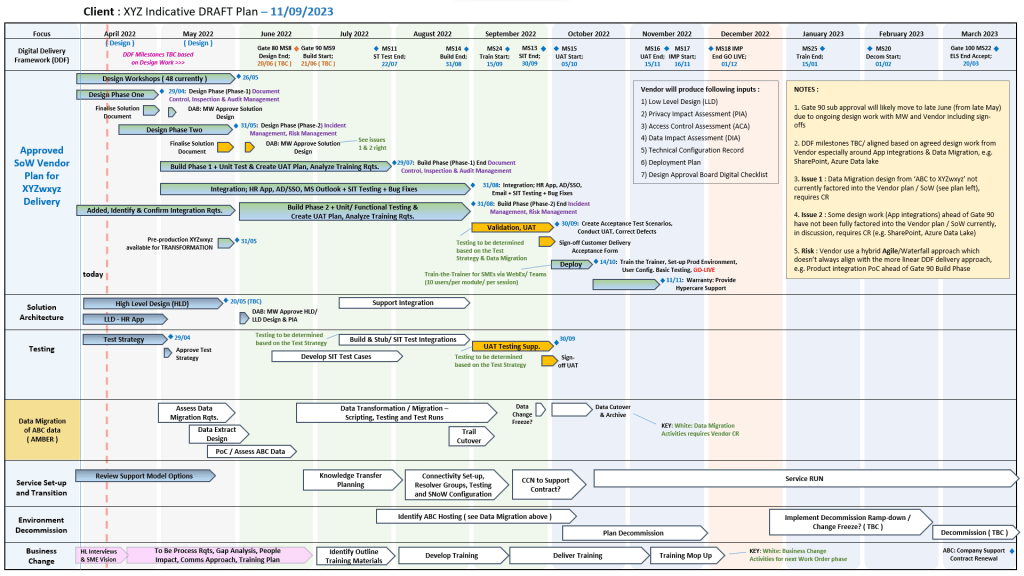
The Project Management Templates by Mark Whitfield constitute a comprehensive toolkit of over 200 editable resources designed to accelerate project delivery across Agile, Waterfall, and PRINCE2 frameworks.
The structural breakdown of the core templates is organised by functional category, specific template, integrated Microsoft Office tool, and operational description:
1. Project Planning & Scheduling
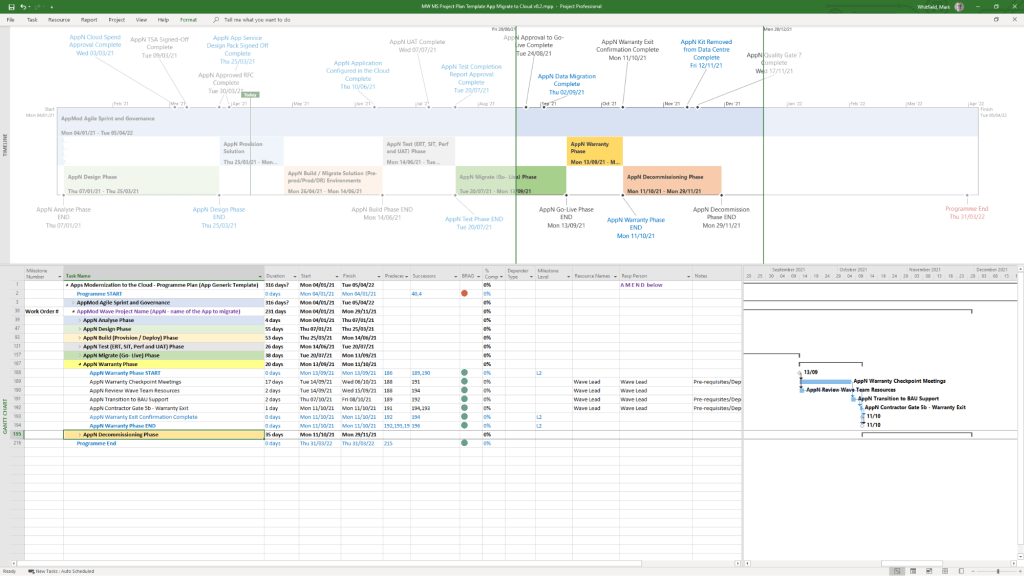
Detailed SDLC Project Plan
MS Tool: Microsoft Project (.mpp)
Description: A master schedule structured around the Software Development Lifecycle (SDLC) from development through testing, deployment, and Early Live Support (ELS), easily toggled between Agile Scrum and traditional Waterfall.
PRINCE2 7th Edition Project Plan
MS Tool: Microsoft Project (.mpp) & MS Excel (.xlsm)
Description: Fully annotated task list aligned with the 7th edition principles, colour-coded by activity type (blue for artifact creation, brown for management decisions, purple for updates).
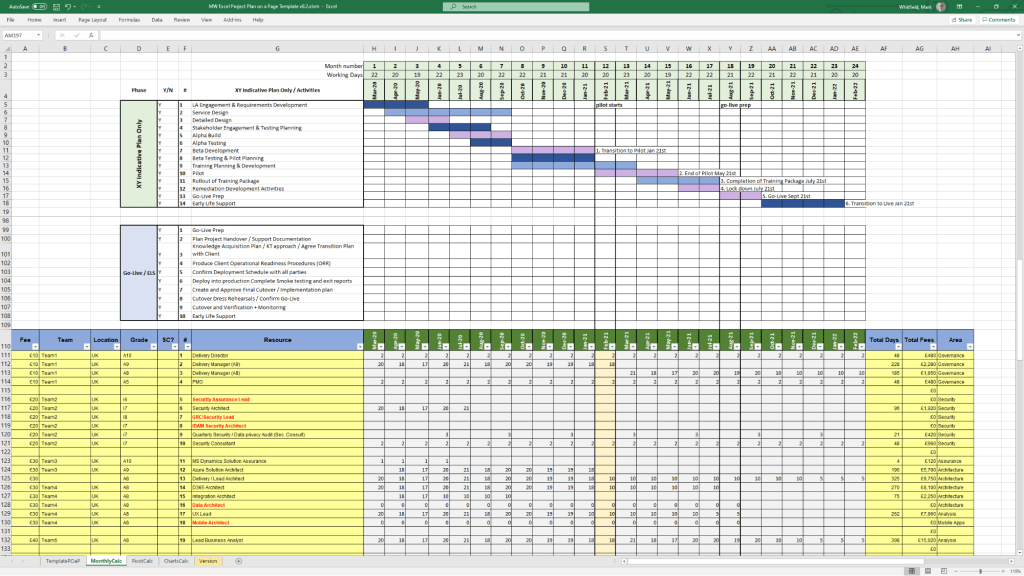
Detailed Waterfall Project Planner
MS Tool: MS Excel
Description: A portable, license-free alternative to MS Project featuring baseline versus forecast tracking, an integrated Gantt chart view, and automated progress charts.
Plan on a Page (POaP)
MS Tool: MS PowerPoint & MS Excel
Description: High-level, executive-ready roadmaps containing over 30 slide variations used to communicate project timelines, key milestones, and work streams to senior stakeholders.
1. Project Planning & Scheduling POAP MS PowerPoint Templates2. Project Planning & Scheduling MS Project Templates3. Project Planning & Scheduling MS Excel Templates
2. Operational Control & Governance
Comprehensive RAID Log & Charts
MS Tool: MS Excel
Description: A highly detailed central registry featuring distinct tabs to track Risks, Actions, Issues, Opportunities, Dependencies, Lessons Learned, and Change Requests alongside visual metric dashboards.
Basic RAIDs Tracker
MS Tool: MS Excel
Description: A scaled-down, simplified version of the master RAID log optimized for quick turnarounds, minor bids, and low-complexity projects.
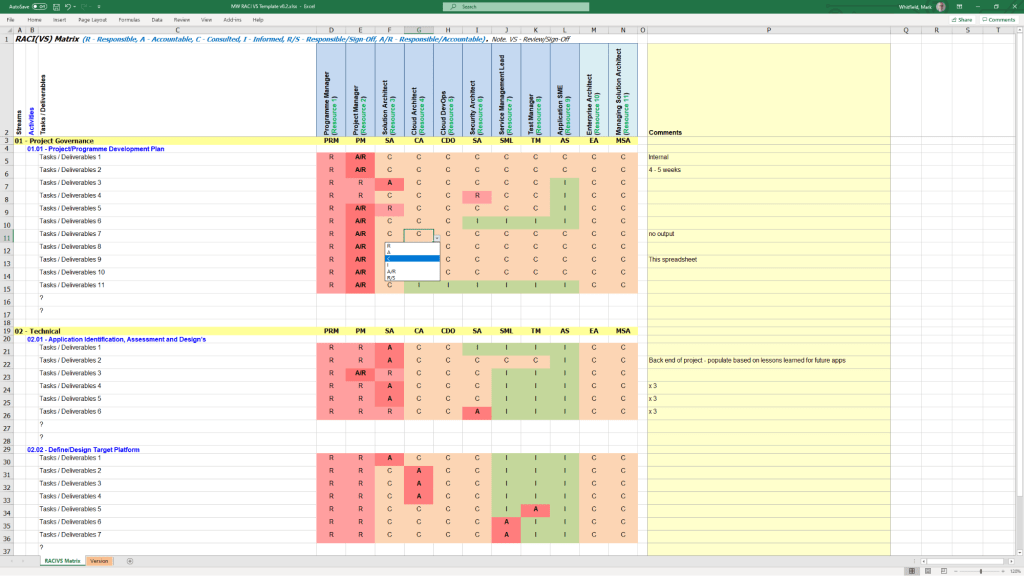
RACI Matrix
MS Tool: MS Excel
Description: A governance sheet mapping project deliverables against specific team roles to clarify who is Responsible, Accountable, Consulted, and Informed.
Agile Story Dependency Tracker
MS Tool: MS Excel
Description: A specialised log to document and track blocker stories tied to external suppliers or client-side dependencies that risk driving scope changes.
1. Operational Control & Governance MS Excel RACI Template
3. Financial & Resource Management
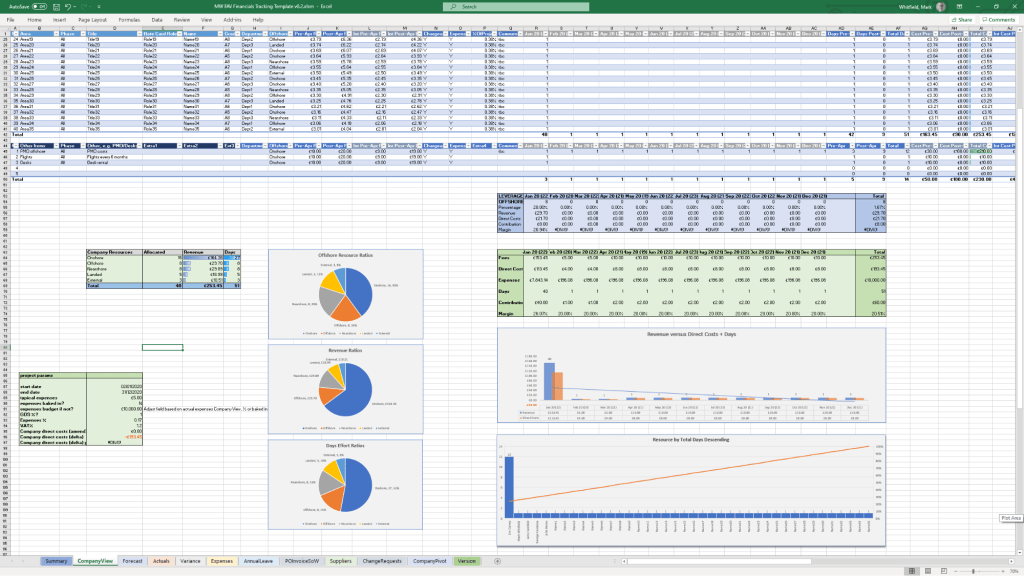
Project Financial Tracker
MS Tool: MS Excel
Description: A financial controller mapping internal and external forecast costs against actuals, factoring in margins, variances, supplier fees, and expense categories.
Resource, Sickness, & Leave Tracker
MS Tool: MS Excel
Description: An operational matrix monitoring annual leave, sickness, and training schedules to adjust resource availability and capacity within the master schedule.
1. Financial & Resource Management MS Excel Templates
4. Agile Delivery Metrics
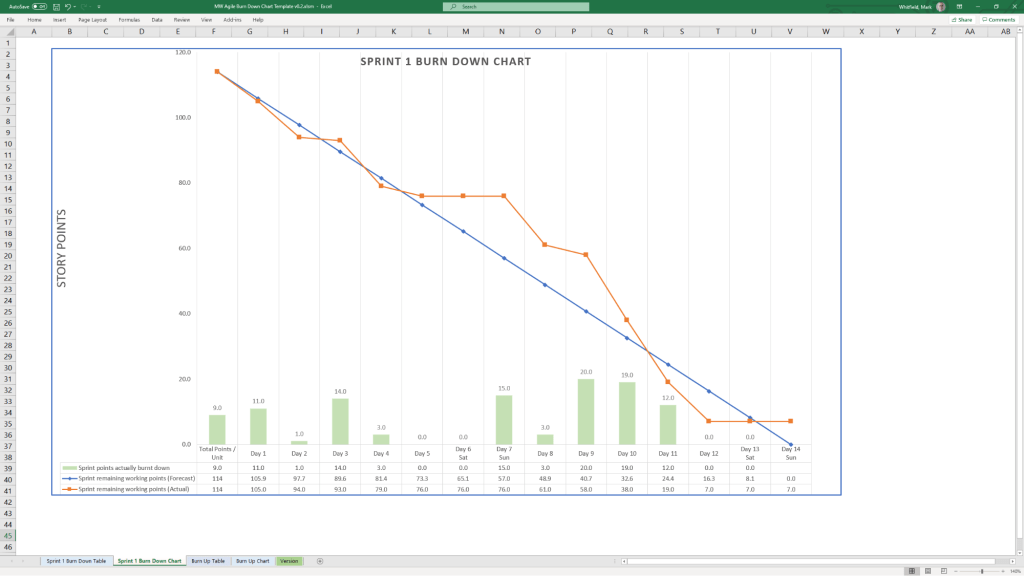
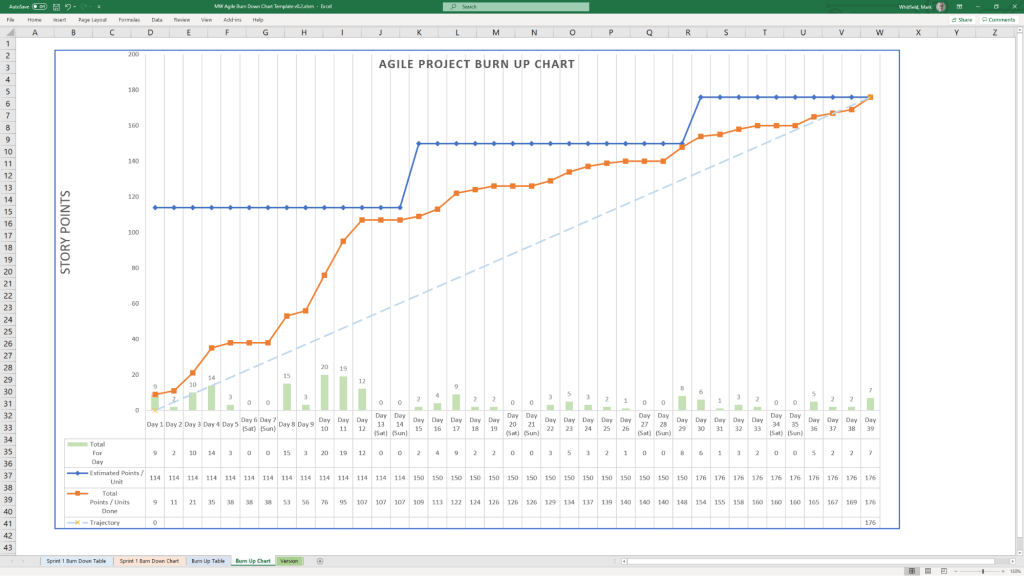
Agile Burn Down & Burn Up Charts
MS Tool: MS Excel
Description: Manual data-table tracking solutions designed to visualise sprint or release velocity for teams operating without access to enterprise tools like Jira.
1. Agile Burn Down Chart in MS Excel Template Example2. Agile Burn Up Chart in MS Excel Template Example
5. Communications & Administration
PRINCE2 Management Products
MS Tool: MS Word (.doc)
Description: A full portfolio of standard documentation masters including Project Initiation Documents (PID), Project Briefs, Highlight Reports, and Business Cases.
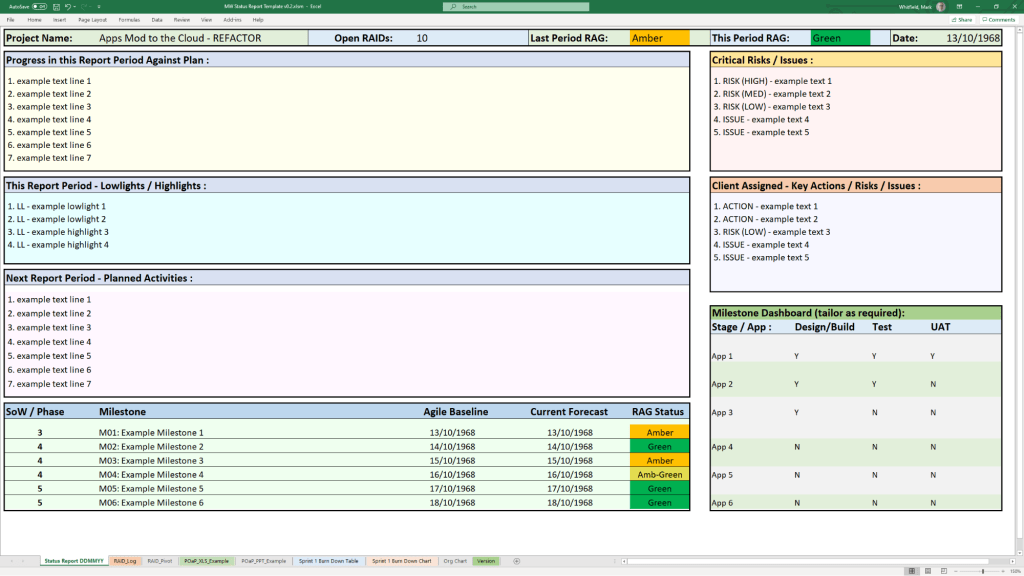
Project Status Report
MS Tool: MS Word & MS PowerPoint
Description: Weekly and monthly progress reporting templates featuring structured sections for milestones, blockers, financial status, and RAG indicators.
Kick-Off Deck & Mobilisation Kit
MS Tool: MS PowerPoint
Description: Onboarding and alignment slide decks designed to define scope, establish ground rules, and guide teams through project initiation.
Meeting Minutes Template
MS Tool: MS Word
Description: An action-oriented meeting layout tailored for capturing critical decisions, owners, and deadlines uniformly.
1. Communications & Administration MS Excel Status Report Template Example
The best approach to writing a project plan breakdown is to use a top-down decomposition strategy centered on a Work Breakdown Structure (WBS). This technique methodically slices a complex, high-level project into smaller, manageable chunks called work packages, ensuring that nothing is missed.
To build a flawless, actionable project breakdown, you must establish the project’s foundation before dissecting it into individual tasks.
1. Define the Scope and Deliverables
Before diving into a micro-level breakdown, you must know what you are building—and what you are not building.
Write a scope statement: Document the final outcomes, project boundaries, and explicit exclusions to prevent scope creep.
Identify major deliverables: Determine the high-level milestones or chunks of tangible value that must be completed.
Apply the 100% rule: The Project Management Institute (PMI) notes that your WBS must include 100% of the internal, external, and interim project management work.
2. Structure the Levels of Decomposition
A good project plan breakdown uses hierarchical tiers. Do not mix daily tasks with macro phases. Instead, follow a logical breakdown hierarchy:
Level 1 (The Project): The overall project objective or final product.
Level 2 (Phases or Major Deliverables): Broad operational segments (e.g., Initiation, Design, Development, Testing).
Level 3 (Sub-deliverables): Specific components within a phase (e.g., under Development, you might have Frontend Architecture).
Level 4 (Work Packages): The lowest level of the WBS. These are discrete items that can be assigned to a specific team or individual and estimated for time and budget.
3. Apply the 80-Hour Rule
When decomposing down to the task level, determine how granular you need to be by tracking effort, not just calendar time:
The 80-hour threshold: A single work package should take no more than 80 hours (two weeks of full-time work) and no less than 8 hours to complete.
Avoid micro-management: If a task takes less than 8 hours, group it with others. If it exceeds 80 hours, it is too complex and needs to be broken down further.
4. Build a WBS Dictionary
A visual chart or list is helpful, but context prevents mistakes. For each work package at the bottom of your hierarchy, document:
Task description: Clear language outlining what “done” actually looks like.
Assigned owner: One single person or team responsible for the execution.
Pre-requisites and dependencies: Clarify which tasks must finish before the next can begin.
5. Sequence, Estimate, and Schedule
Once the work is broken down, pull it into a working chronological timeline using software like Microsoft Project (see MS .mpp templates in website banner), Asana or Monday.com.
Sequence activities: Map the chronological order and identify the critical path—the longest string of dependent tasks.
Estimate duration & resources: Gather the actual people doing the work to estimate time, capacity, and material needs realistically.
Add contingency: Factor in safety buffers to protect the project baseline from unexpected delays.