Project Management Deliverables relating to Project Lifecycle

Project management deliverables are the tangible or intangible outputs—products, services, or documents—produced as a result of project activities. They are specific, measurable, and agreed upon by stakeholders to demonstrate progress toward project goals.

Overview of Project Deliverables

Deliverables are essential for breaking down project goals into manageable components, tracking progress, and ensuring stakeholder alignment.

Types of Deliverables:

  • Internal Deliverables: Created for internal use, such as team charters, project plans, and risk logs.
  • External Deliverables: Client-facing, such as a finished software product, marketing campaign, or project report.
  • Process Deliverables: Interim outputs that mark progress, such as prototypes, wireframes, or testing reports.
  • Product Deliverables: The final, completed goods or services delivered.
  • Tangible vs. Intangible: Physical/digital items (e.g., machinery) vs. conceptual outcomes (e.g., a new training program).

Textual/Documentation Deliverables Project Lifecycle

The project lifecycle defines the stages a project goes through from start to finish. Textual and documentation deliverables are key to managing and controlling these stages.

1. Initiation Phase (Initiating)

  • Goal: Define the project at a high level and obtain authorization.
  • Key Deliverables:
    • Business Case: Why the project is needed.
    • Feasibility Study: Whether the project is achievable.
    • Project Charter: A formal document outlining objectives, scope, and key stakeholders.

2. Planning Phase (Planning)

  • Goal: Develop a roadmap for project execution and define constraints.
  • Key Deliverables:
    • Project Management Plan: A comprehensive document (roadmap) detailing tasks, timelines, and resources.
    • Scope Statement/WBS: Defines boundaries and breaks down work.
    • Communication Plan: Strategy for stakeholder communication.
    • Risk Register: Identifies potential threats and mitigation strategies.

3. Execution Phase (Executing)

  • Goal: Carry out the work defined in the plan to produce deliverables.
  • Key Deliverables:
    • Interim Products/Prototypes: Tangible outputs produced.
    • Meeting Minutes/Notes: Documentation of decisions and action items.
    • Change Requests: Documents updating scope or plan.

4. Monitoring and Controlling Phase

  • Goal: Measure performance against the plan and adjust as needed.
  • Key Deliverables:
    • Status Reports: Progress updates on key performance indicators (KPIs).
    • Quality Control Reports: Results of testing and validation.
    • Updated Project Schedule: Reflects current progress.

5. Closing Phase (Closure)

  • Goal: Formally accept deliverables and close out the project.
  • Key Deliverables:
    • Final Product/Report: The completed output.
    • Project Closure Report: Confirms final deliverables and contract closure.
    • Lessons Learned Document: Records successes and areas for improvement.

Best Practices for Managing Deliverables

  • Define Early: Ensure all stakeholders agree on what “done” means at the start.
  • Use Tools: Employ PM software (e.g., Asana, Jira, Monday.com) to track deliverables.
  • Assign Owners: Each deliverable should have a single, clear owner to ensure accountability.
  • Link to KPIs: Connect deliverables to key performance indicators to measure value.

Project Management Deliverables relating to Project Lifecycle
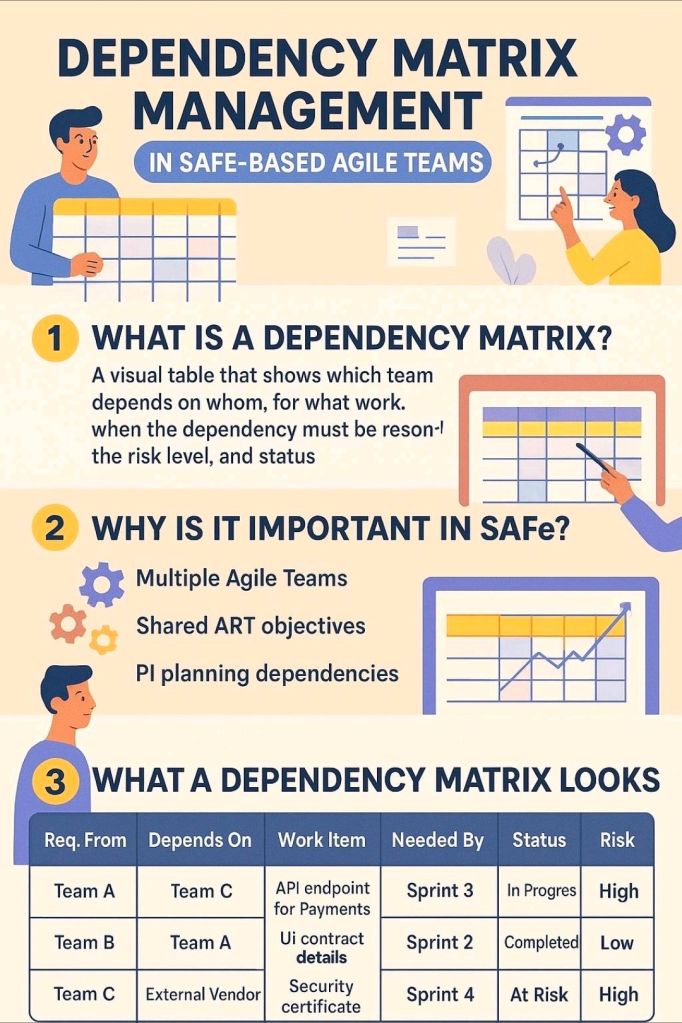
Agile Dependency Matrix Management in Project Management

Agile Dependency Matrix Management in Project Management

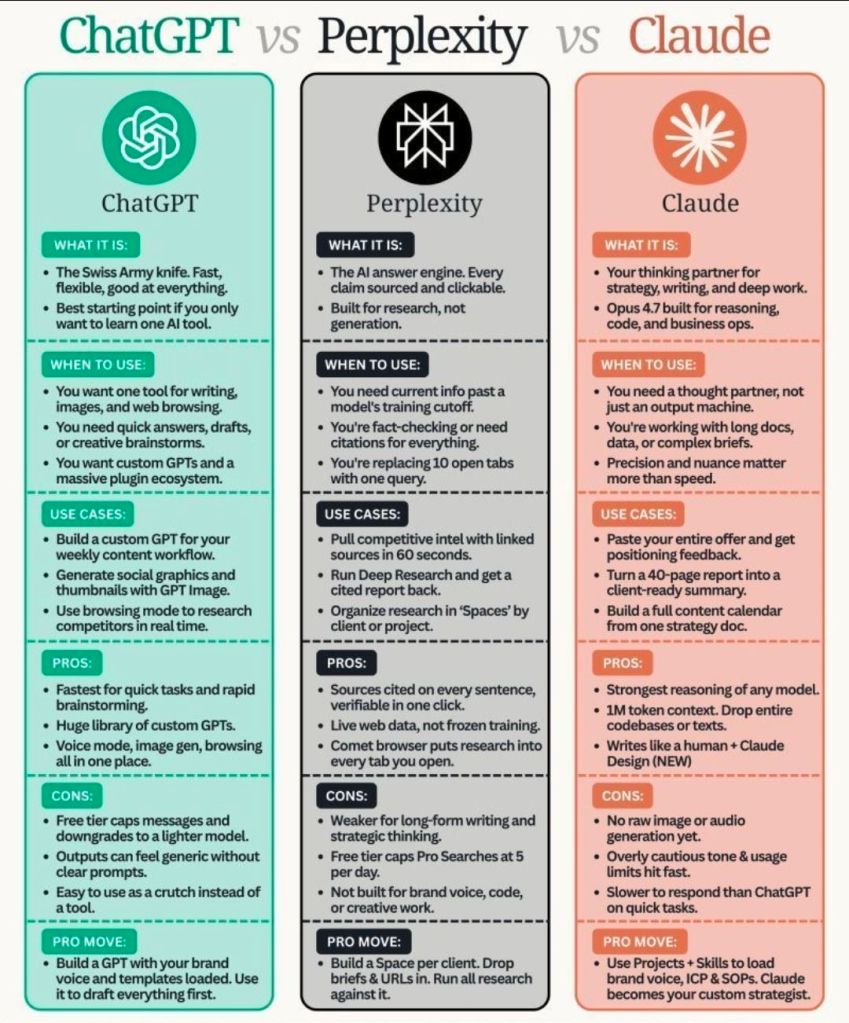
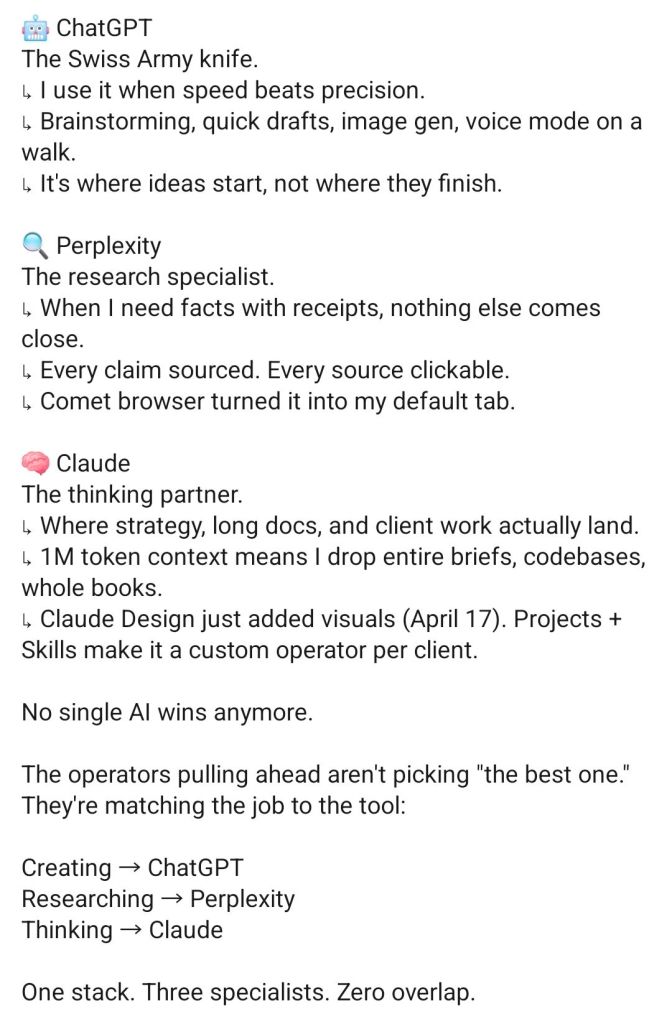
AI – ChatGPT vs Perplexity vs Claude

ChatGPT vs Perplexity vs Claude
ChatGPT vs Perplexity vs Claude, AI

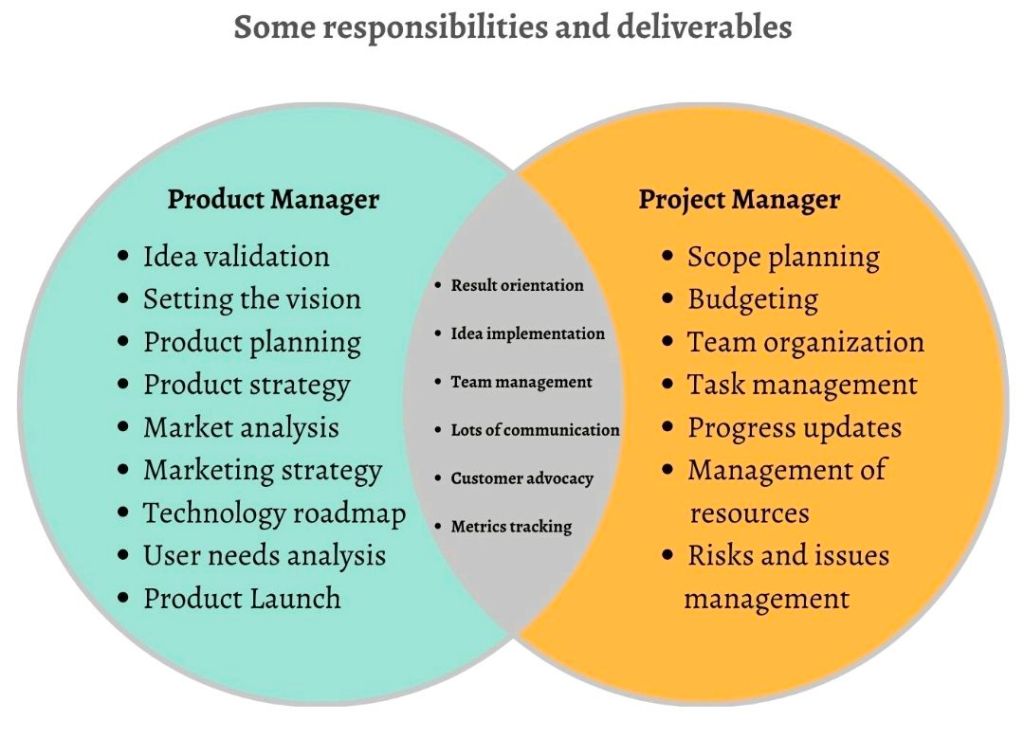
Product Manager and Project Manager responsibilities and deliverables

Product Manager and Project Manager responsibilities and deliverables

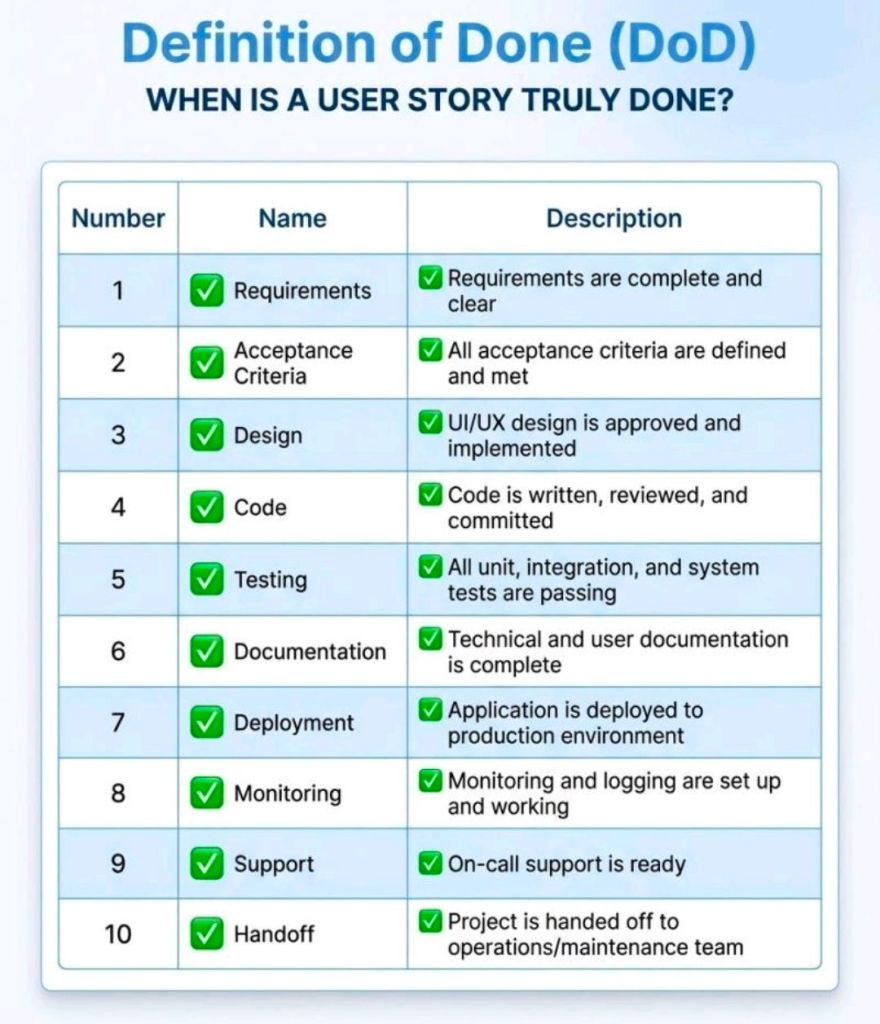
Agile Defintion of Done, DoD

Agile Defintion of Done, DoD

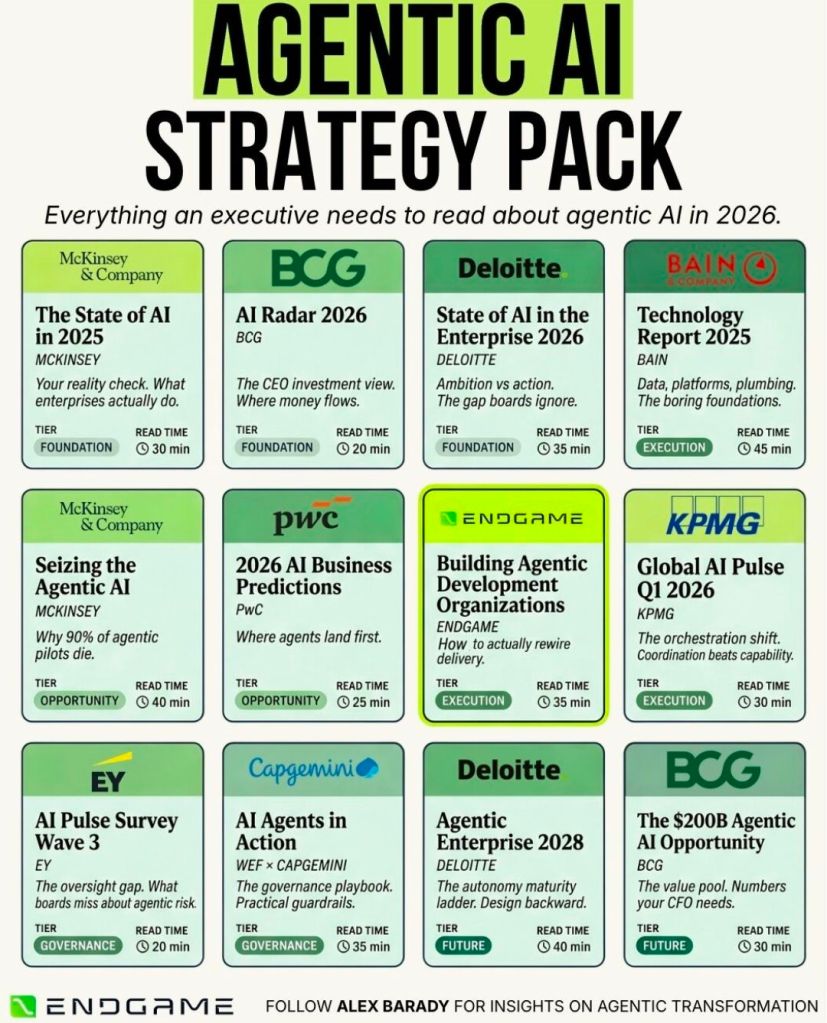
Agentic AI Strategy Pack, read about Agentic AI in 2026

Agentic AI Strategy Pack, read about Agentic AI in 2026

Microsoft Project Timeline by Era, Features and Extensions

Microsoft Project has evolved from a DOS-based scheduling tool in 1984 into a comprehensive project portfolio management (PPM) system and, as of 2024–2026, a cloud-native platform integrating with Microsoft 365 and Planner.

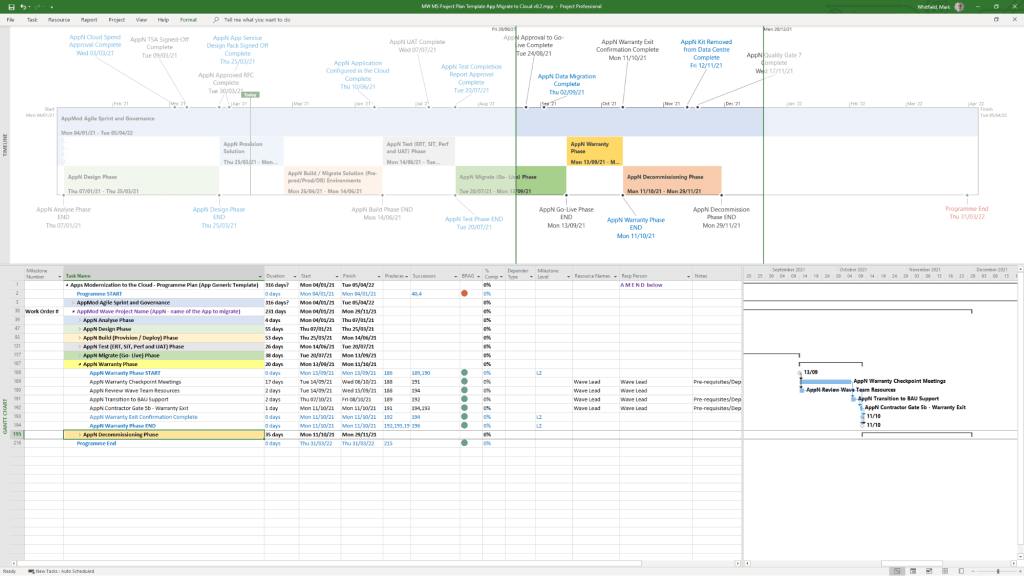
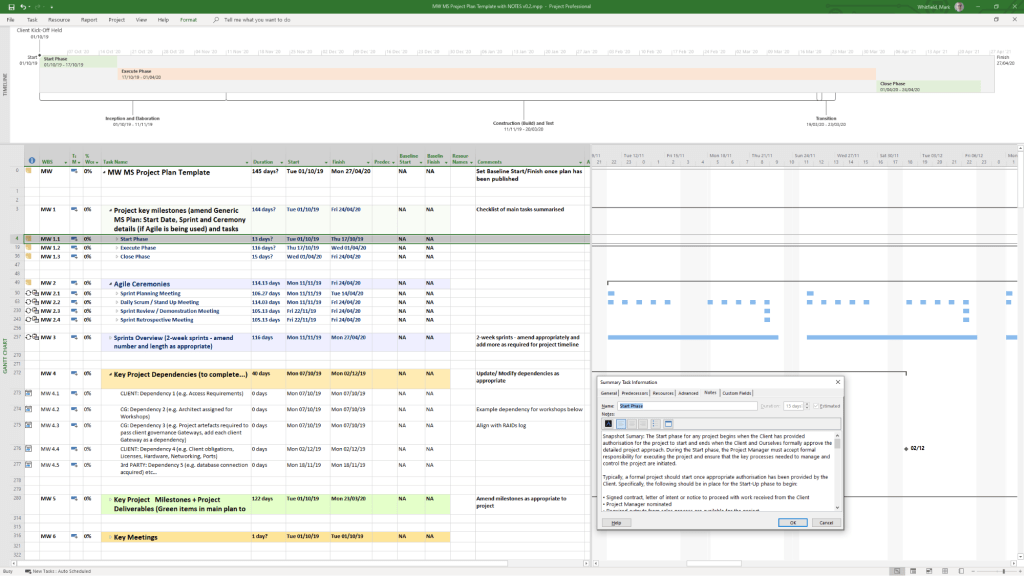
Example MS Template from download bundle

Historical Timeline by Era

1. The DOS Era: Foundations (1984–1989)

  • 1984: Initial release for DOS by a third party, later acquired by Microsoft. Focused on basic Gantt charts and critical path method (CPM).
  • 1985: Microsoft purchases rights; releases Project 2.0.
  • 1986: Project 3.0/4.0 for DOS released.

2. The Windows & Early Office Era: GUI & Integration (1990–1999)

  • 1990: First Microsoft Project for Windows released.
  • 1991: First Macintosh version released.
  • 1993: Project 4.0 for Mac (final Mac version).
  • 1995: Project 95 (v4.1) released: The first 32-bit version, designed to match the Windows 95 interface.
  • 1997/1998: Project 98: Deepened integration with Microsoft Office and introduced improved tracking.

3. The Enterprise & Collaboration Era: Server Integration (2000–2010)

  • 2000: Introduced “Microsoft Project Central” for team collaboration, allowing web-based status reporting.
  • 2002/2003: Released with Server components, allowing enterprise-level resource management.
  • 2007: Introduced Office Fluent Ribbon interface and enhanced reporting capabilities.
  • 2010: Significant update adding the Timeline View (top-down view) and manual scheduling options.

4. The Cloud & Subscription Era: PPM & Modernization (2013–2023)

  • 2013: Launch of Project Online (PPM) to provide full cloud capabilities.
  • 2016/2019: Introduced Resource Engagements and improved visual reporting.
  • 2019/2020: Release of “Project for the web,” a completely new platform based on the Power Platform (Dataverse), separate from the legacy Desktop Client.

5. The Future Era: Unified Planner & Web (2024–2026)

  • 2024: Deepened integration with Microsoft Teams, OneDrive, and SharePoint.
  • 2026: Project Online is scheduled to be discontinued in September 2026.
  • 2026/Future: “Project for the web” is being rebranded and merged into Microsoft Planner.

Detailed Breakdown of Key Features

  • Scheduling & Gantt Charts: Core functionality for mapping dependencies, critical paths, and durations.
  • Resource Management: Tools to allocate resources, manage costs, and track workloads, evolving from desktop-based to enterprise-wide resource leveling.
  • Timeline View: Introduced in 2010, this feature allows creating a “big picture” summary of key tasks and milestones, ideal for stakeholder reporting, customizable by adding tasks directly from the Gantt chart.
  • Collaboration: Shifted from email-based sharing to Microsoft 365, Teams, and Sharepoint integration.
  • Project Versions: Available as Standard (desktop), Professional (collaboration features), and cloud-based subscription plans (Plan 1/3/5).

Summary of Major Version Transitions

  • DOS (1984) ………. Windows (1990) ……….(32-Bit (1995) ………. Server (2000) ………. Online (2013) ……….. Web/Dataverse (2019) ……… Planner (2026).

Microsoft Project Extensions :

Microsoft Project primarily uses .mpp for project plans and .mpt for templates, with specialized extensions like .vsdx for timeline visuals. These files are used to manage project schedules, resources, and budgets, with support for add-ins that integrate with Microsoft Teams, Power BI, and other Office applications.

Core Microsoft Project Extensions

  • .mpp: The native file format for Microsoft Project, containing all project data, including schedules, tasks, resources, and budgets.
  • .mpt: Microsoft Project Template files, used to create new projects with predefined structures, settings, and views.
  • .vsdx: Used to create and save custom timelines, which can be imported into or exported from Project.

File Compatibility & Viewers

Because .mpp files require a Microsoft Project license, alternative tools are used to view them without the desktop application:

  • Project Plan 365: A widely used viewer and editor compatible with MPP files from 2010 to 2026.
  • Gantt Pro: An online tool for viewing and sharing MPP file schedules.
  • Project Viewer 365: A Microsoft Store app designed to open and print .mpp files.

Add-ins and Integrations

Extensions for Microsoft Project can be found via the Office Add-ins store, improving productivity and integration:

  • Power BI: Creates interactive dashboards from Project data.
  • Microsoft Teams: Allows teams to collaborate on project plans.
  • Office Add-ins: Available for various versions of Project Professional and Standard to enhance functionality.

Microsoft Project Timeline by Era, Features and Extensions

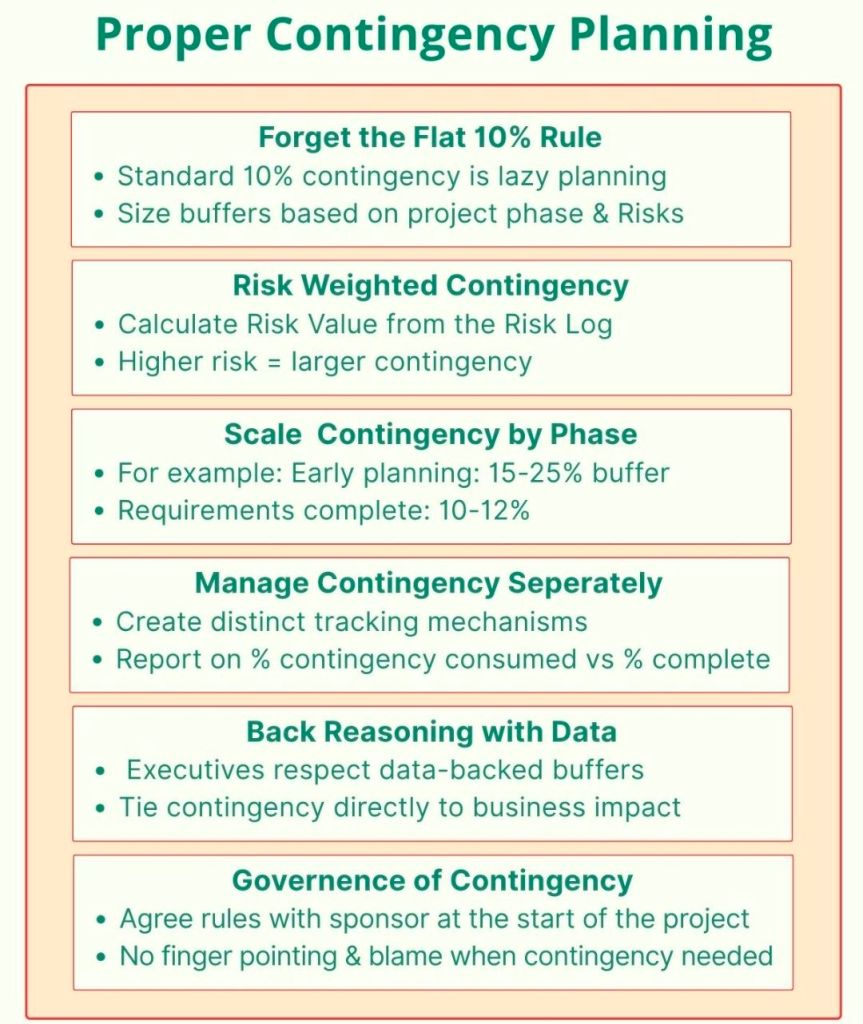
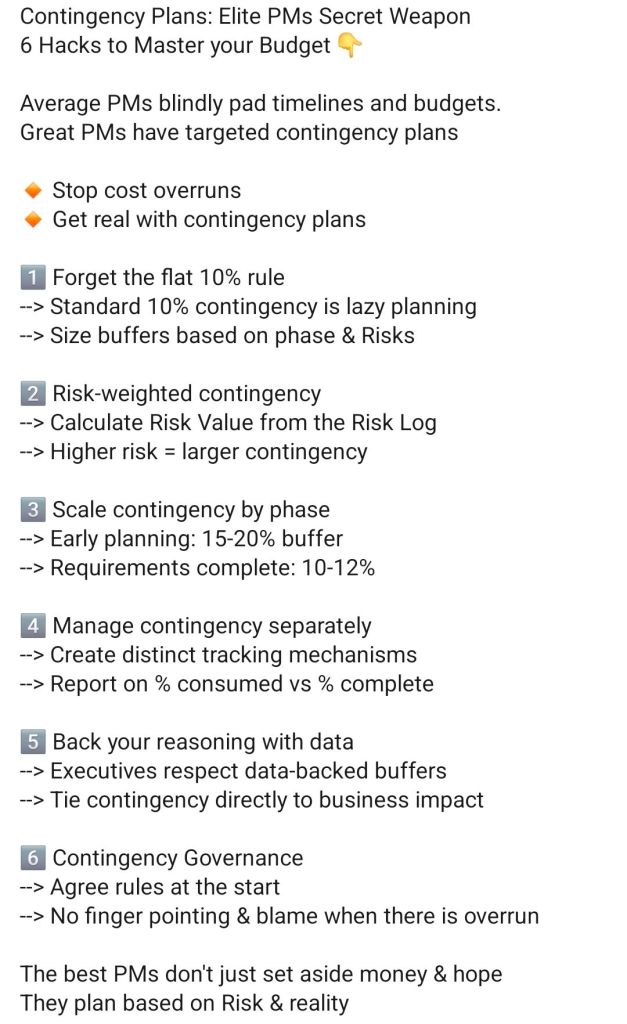
Proper Contingency Planning

Proper Contingency Planning