The Theory of Constraints (TOC) is a management philosophy introduced by Dr. Eliyahu M. Goldratt in his 1984 bestselling business novel, The Goal.
At its core, TOC operates on a simple premise: A chain is only as strong as its weakest link. In any complex system—be it a manufacturing plant, a hospital, or a software team—there is always one specific constraint (bottleneck) that limits the system from achieving more of its goal. If you improve anything other than that constraint, you are wasting your time.
The Five Focusing Steps
TOC uses a rigorous five-step process for continuous improvement:
Identify the constraint.
Exploit the constraint (ensure it doesn’t waste time).
Subordinate everything else (align the whole system to support the constraint).
Elevate the constraint (invest in more capacity if steps 2 and 3 weren’t enough).
Repeat (prevent inertia; find the next bottleneck).
Annotated Timeline of TOC Evolution
1979 – Optimized Production Technology (OPT): Goldratt introduces OPT, a scheduling software that challenged traditional cost accounting by focusing on throughput.
1984 – The Goal Published: Goldratt pivots from software to education. He uses a fictional story to introduce the Drum-Buffer-Rope (DBR) method and the concept of “Throughput Accounting.”
1990 – The Haystack Syndrome: This marks the shift toward formalising TOC metrics: Throughput (money coming in), Inventory (money stuck inside), and Operating Expense (money going out).
1994 – It’s Not Luck: Goldratt introduces the Thinking Processes (TP)—a set of logical tools (like the Current Reality Tree) used to solve complex problems and overcome resistance to change.
1997 – Critical Chain: TOC is applied to Project Management. This introduced “buffers” at the end of project paths rather than individual tasks, drastically reducing project durations.
2003 – Strategy & Tactic (S&T) Trees: A framework developed to synchronise large-scale organisational change, ensuring every action aligns with the ultimate goal.
2000s–Present – Throughput Economics: Integration of TOC with Lean and Six Sigma (often called TLS) becomes the gold standard for high-performance manufacturing.
Theory of Constraints (TOC) Overview and Timeline History
Critical Chain Project Management (CCPM) represents a paradigm shift in how timelines are managed, moving away from traditional task-based safety to system-wide buffers. Its history is deeply rooted in the Theory of Constraints (TOC) and evolved through four primary eras of modern project management.
The Foundations: Pre-1958
Before the formal creation of CCPM, the industry relied on “craft-based” approaches and the early Gantt Chart (1910s) to visualize task durations. During this era, projects like the Hoover Dam (1931) and the Manhattan Project proved that large-scale coordination was possible, but they lacked a systematic way to handle resource constraints or project-wide uncertainty.
The Traditional Era: 1958 – 1979
This period saw the birth of the “Critical Path,” the ancestor of the “Critical Chain.”
1957: The Critical Path Method (CPM) was invented by the DuPont Corporation to manage chemical plant maintenance.
1958: The Program Evaluation Review Technique (PERT) was developed for the U.S. Navy’s Polaris Project, introducing probabilistic task durations.
The Limitation: While these methods identified the longest sequence of tasks, they often ignored resource availability, leading to frequent delays and “multitasking” inefficiencies.
The Conceptual Era: 1980 – 1994
The theoretical seeds for CCPM were planted during the rise of the personal computer and the introduction of a new management philosophy.
1984:Dr Eliyahu M. Goldratt published his seminal business novel, The Goal, introducing the Theory of Constraints (TOC).
Core Principle: Goldratt argued that every system has at least one constraint that limits its output. Managing this “bottleneck” is the key to overall performance.
Focus Shift: Organizations began looking at “flow” rather than just individual task completion.
The CCPM Era: 1995 – Present
CCPM was formally introduced as a distinct methodology to address the failures of traditional CPM.
1997: Goldratt published the book “Critical Chain”, officially launching the method.
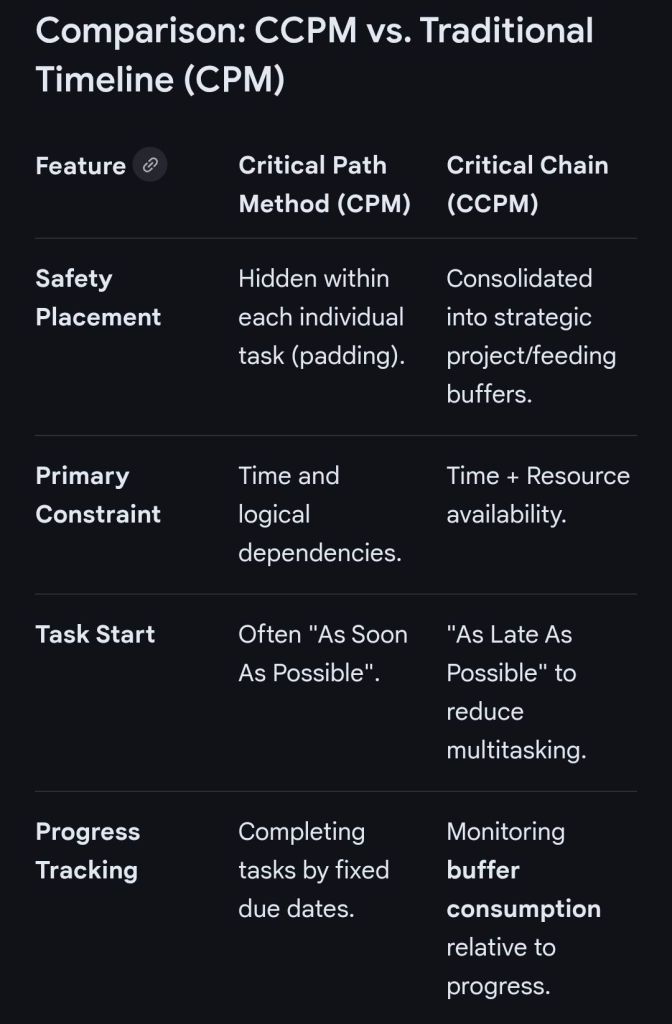
Key Innovations: Unlike CPM, the Critical Chain accounts for both task dependencies and resource constraints. It replaced individual task “safety margins” with:
Project Buffers: A collective time safety net placed at the end of the project.
Feeding Buffers: Placed where non-critical tasks feed into the critical chain to prevent delays.
Fever Charts: A new visual tool for tracking buffer consumption rather than just task deadlines.
Modern Integration: In the 21st century, CCPM has been integrated with Agile and Lean practices to help organizations manage multi-project pipelines and global resource pools.
Critical Chain Project Management (CCPM) timelines differ from traditional methods by shifting safety margins from individual tasks to strategic buffers at the end of the project or at integration points. This approach accounts for both task dependencies and resource constraints to determine the “Critical Chain”—the true longest path in a project.
Core Components of a CCPM Timeline
The Critical Chain: The longest sequence of dependent tasks, adjusted for resource availability.
Aggressive Task Estimates: Tasks are estimated at a 50% confidence level (how long it takes if things go well) rather than the traditional 90% (safe) estimate.
Project Buffer: A single aggregate buffer placed at the very end of the project to protect the final delivery date.
Feeding Buffers: Placed at points where non-critical task sequences (feeding chains) merge into the critical chain, preventing delays in minor tasks from affecting the main timeline.
Resource Buffers: Virtual markers or alerts placed before critical tasks to ensure that key resources (people or equipment) are ready to start exactly when needed.
CCPM versus Traditional Timeline (CPM)
Implementing a CCPM Timeline
Identify the Critical Path: Map the logical sequence of tasks.
Level Resources: Adjust the schedule so no single resource is over-allocated, transforming the path into a Critical Chain.
Strip Task Padding: Reduce task durations by roughly 50% to eliminate “Student Syndrome” (procrastinating until the last minute).
Insert Buffers: Add a Project Buffer (typically 50% of the chain’s length) at the end and Feeding Buffers where non-critical paths merge.
Monitor via Fever Chart: Use a Fever Chart to track if the buffer is being consumed faster than tasks are being completed.
Critical Chain Project Management (CCPM) Overview and Timeline
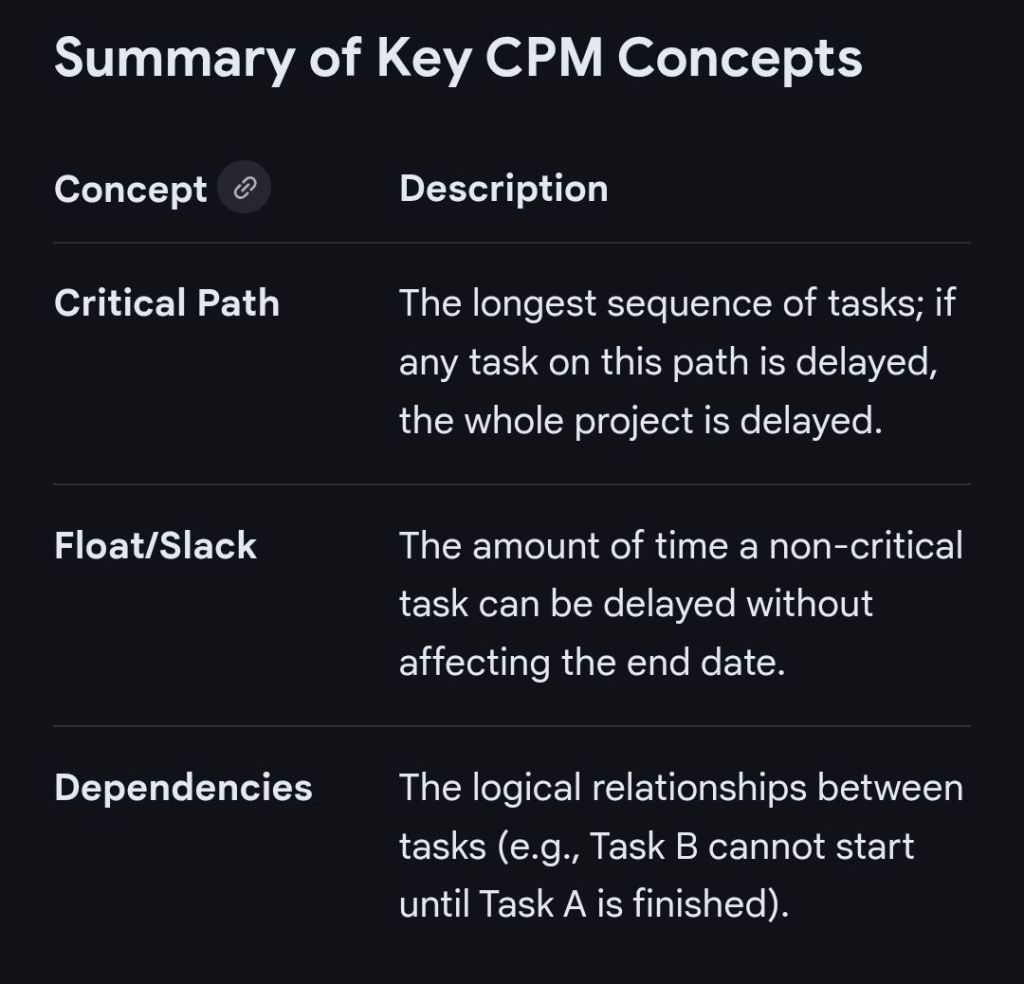
The Critical Path Method (CPM) is a mathematical algorithm used for scheduling a set of project activities. It identifies the longest sequence of dependent tasks required to complete a project, which in turn determines the shortest possible duration to finish it.
Timeline of the Critical Path Method
The evolution of CPM is categorised into four primary eras, moving from manual mathematical foundations to modern AI-driven automation.
1. Pre-Formalisation Era (1940s – Early 1950s)
1940–1943: DuPont develops precursor techniques for scheduling that are applied to the Manhattan Project.
Early 1950s: Growing complexity in industrial plants leads to “scheduling crises,” where traditional Gantt charts are no longer sufficient for managing thousands of interdependent tasks.
2. The Development & Mainframe Era (1956 – 1969)
1956: Morgan R. Walker of DuPont and James E. Kelley Jr. of Remington Rand begin collaborative research to improve plant maintenance scheduling.
1957–1958: The duo formalises the Critical Path Method (CPM).
1958: The U.S. Navy and Booz Allen Hamilton develop the Program Evaluation and Review Technique (PERT) for the Polaris missile program; it is from this project that the term “critical path” is actually coined.
1959: The first computer-based CPM is implemented on a UNIVAC mainframe, allowing DuPont to reduce plant maintenance downtime from 125 to 78 hours.
1966: CPM is used for the first time in a massive skyscraper project for the construction of the World Trade Center Twin Towers in New York City.
3. The PC Revolution & Methodology Expansion (1970s – 1999)
1970s: Dedicated project management software companies like Oracle (then Software Development Laboratories) begin to emerge.
1984: Eliyahu M. Goldratt introduces the Theory of Constraints (TOC), which later influences the development of the Critical Chain.
1980s: The advent of the Personal Computer (PC) makes CPM accessible to smaller companies, moving it away from expensive, bulky mainframes.
1997: Eliyahu M. Goldratt introduces Critical Chain Project Management (CCPM), a more sophisticated evolution of CPM that accounts for resource constraints and buffers.
4. Modern Era: Digital Integration & AI (2000 – Present)
2000s–2010s: CPM becomes a standard feature in cloud-based tools like Asana, Wrike, and Microsoft Project, allowing for real-time schedule updates.
2020: The COVID-19 pandemic accelerates the adoption of virtual project management tools, where CPM is used to manage remote, globally distributed teams.
2025–Present:Artificial Intelligence is increasingly used to predict risks and automatically calculate “crashing” scenarios (reducing task duration to shorten the overall project) based on historical data.
Summary of Key CPM Concepts
Critical Path Method CPM Overview and Timeline by year