Requirements Traceability Matrix RTM & Business Analyst BA
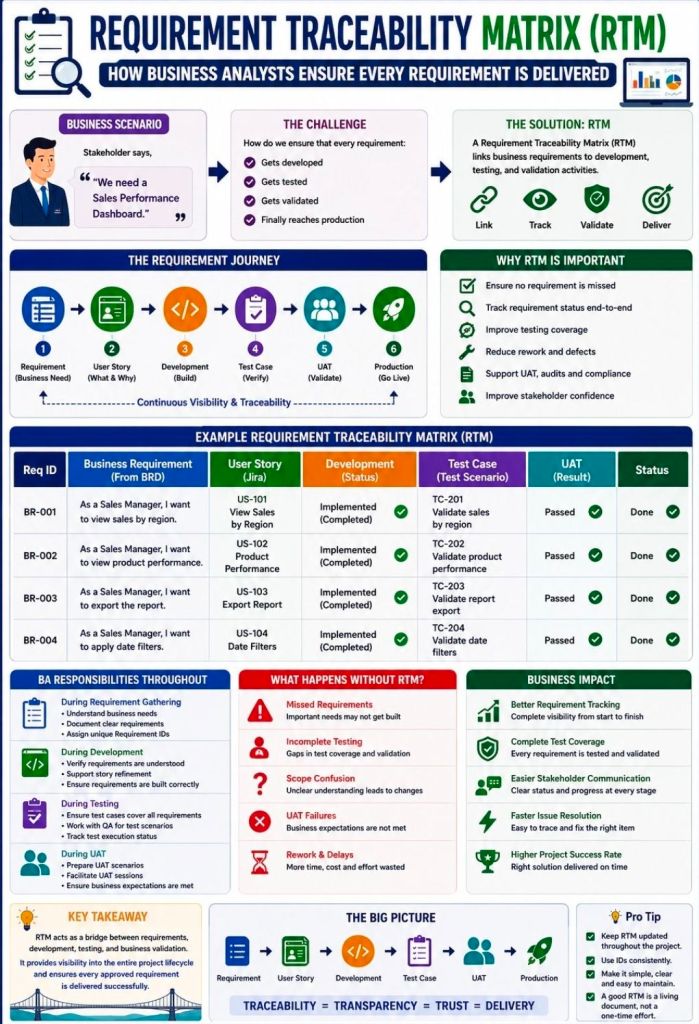
A Requirements Traceability Matrix (RTM) is a structured project management document that links user and stakeholder requirements directly to their corresponding design elements, development deliverables, and verification test cases.
Acting as a living checklist throughout the project life cycle, its primary purpose is to ensure 100% test coverage, validate that all client requests are fulfilled, and prevent scope creep by identifying undocumented work.
The visual layout of a typical RTM template maps individual requirement rows against critical validation milestones.
🔄 Three Main Types of Traceability
The configuration of an RTM depends heavily on the direction of tracking needed for the project:
Forward Traceability: Tracks requirements forward into design, code, and test cases. It ensures the project executes every requested feature and that nothing gets left behind.
Backward (Backward-Looking) Traceability: Traces test cases and final deliverables back to the original requirement. It checks for scope creep, confirming that no extra, unauthorized features were added.
Bidirectional Traceability: Combines both approaches. It links requirements from origin to destination and vice versa, providing clear visibility during change management or troubleshooting.
📋 Structured Breakdown of RTM Content
A standard RTM is formatted as a multidimensional table. Below is the foundational structure, broken down into its logical data components:
1. Core Requirement Parameters
Requirement ID: A distinct alphanumeric identifier (e.g., REQ-001, BRD-102) for quick cross-referencing.
Requirement Type: Classifies the item (e.g., Business, Functional, Technical, UI, Security, or Regulatory Compliance).
Requirement Description: A concise textual explanation defining exactly what the feature or system must achieve.
Source/Origin: The document, stakeholder, client request, or meeting minutes where the requirement originated.
Priority Level: The urgency ranking of the item, usually categorized as High, Medium, or Low (or via MoSCoW ranking).
2. Design and Development Artifacts
Functional Specification ID: Links the requirement to the specific section of the functional design document.
Technical Design/Architecture Module: Points to the code packages, database tables, or system architectural components implementing the requirement.
3. Verification & Validation (Testing) Data
Test Case ID: The unique ID of the specific test cases designed to validate the feature (e.g., TC-101, TC-102).
Test Case Description/Objective: A snapshot of what the test case actually checks.
User Acceptance Testing (UAT) ID: Specific ID linking to end-user validation scenarios.
4. Execution & Quality Control Tracking
Test Execution Status: The real-time health indicator of the testing suite (e.g., Passed, Failed, Blocked, Not Run).
Defect/Bug ID: If a test fails, this column logs the active issue tracker ID (e.g., Jira ticket BUG-404) linked to the breakdown.
Current Deployment Status: Defines the project readiness stage (e.g., In Progress, Dev, QA, Production).
💡 Core Benefits of Maintaining an RTM
Prevents Missed Features: Verifies that every business requirement translates into clean code and valid testing cycles before software deployment.
Streamlines Change Management: If a client alters a feature, developers can quickly scan the RTM row to see exactly which code modules and test scripts need updates.
Simplifies Compliance Audits: Serves as regulatory proof in safety-critical landscapes (like medical devices or automotive software) that every target function passed validation.
Requirements Traceability Matrix RTM & Business Analyst BA
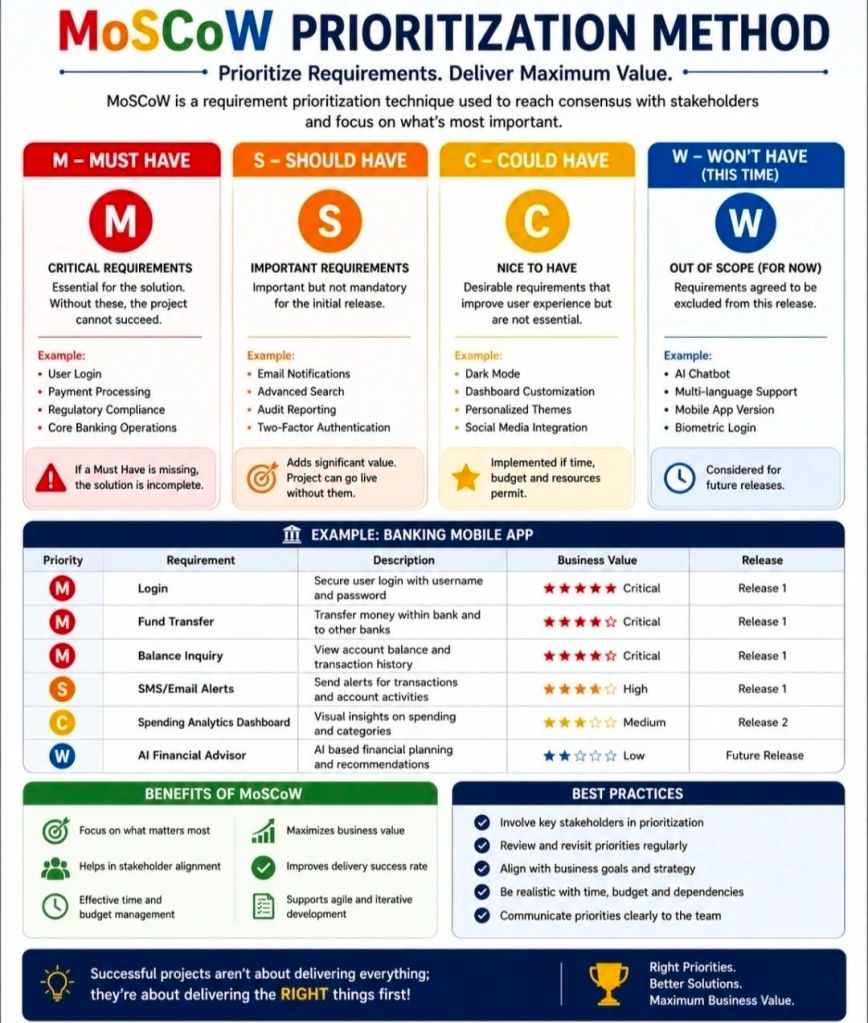
The MoSCoW method is a popular requirements prioritization technique used in project management and software development to help stakeholders reach a common understanding on the importance of deliverables. It categorizes tasks into Must, Should, Could, and Won’t have.
The MoSCoW Categories
Must Have: Non-negotiable requirements that are critical for success, compliance, or safety. Without these, the project is considered a failure and cannot be deployed.
Should Have: High-priority, important features that add significant value but are not strictly vital for immediate delivery. These are generally included if time permits, or they may have a manual workaround.
Could Have: Desirable, “nice-to-have” features that are small and easy to implement. These improve user experience but can be deferred or dropped without impacting the project’s overall success.
Won’t Have (or Won’t Have this time): Features that have been mutually agreed upon as out-of-scope for the current release or timeframe. They are deliberately excluded to prevent scope creep, though they may be added to the backlog for future cycles.
Why and When to Use It
Resource Management: It helps maximize limited time, budget, and resources by focusing effort on the features that provide the most immediate ROI.
Stakeholder Alignment: It acts as a negotiation tool, forcing stakeholders to agree on what is genuinely critical versus what is purely desirable.
Agile Environments: It is a foundational practice in Agile frameworks like DSDM, where teams adhere to fixed deadlines (timeboxes) and adjust the project scope instead.
Best Practices for Implementation
The 60-20-20 Rule: A common best practice is to ensure that Must Haves consume no more than 60% of the team’s total effort. Roughly 20% should be allocated to Should Haves, and 20% reserved for Could Haves to act as contingency room.
Challenge Assumptions: When classifying a requirement as a Must, ask: “What happens if we don’t do this? Can we still deploy the product?” If the project can still function—even awkwardly—it is likely a Should or Could.
Continuous Review: Priorities aren’t static. Re-evaluate your MoSCoW list at the end of every sprint or development cycle, as a Could Have from a previous phase might be upgraded or permanently discarded.
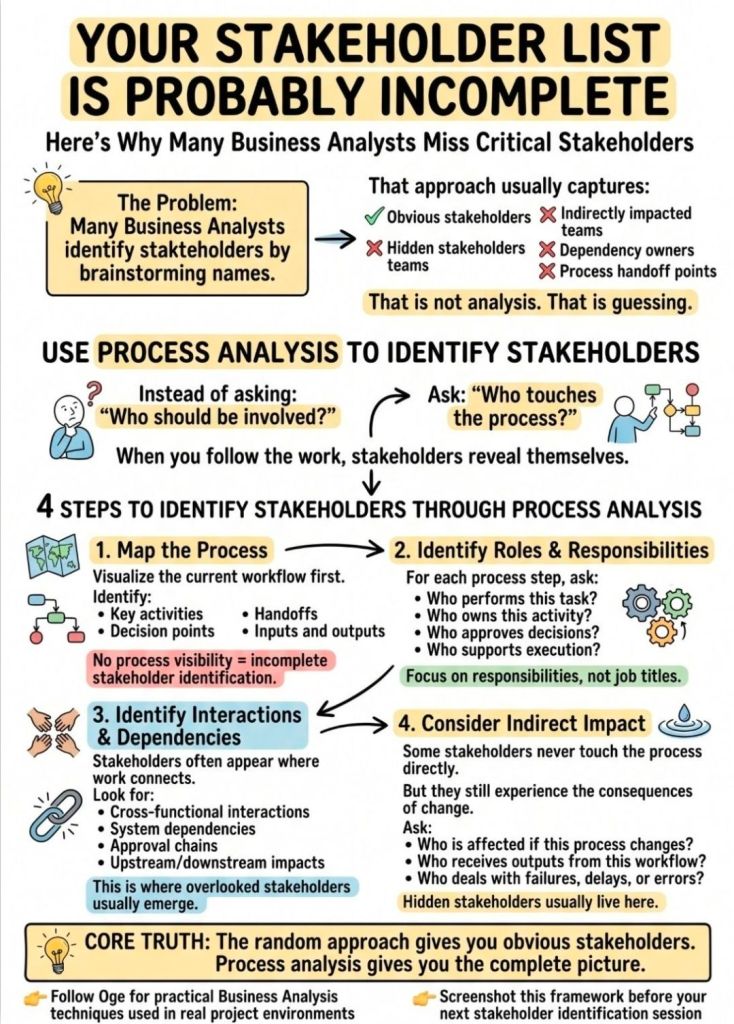
Completing the Stakeholder List using Process Analysis
Completing a stakeholder list using process analysis involves tracing the end-to-end lifecycle of a process to identify every individual, team, or organization that interacts with, influences, or is impacted by it. This ensures no hidden users, bottlenecks, or approvers are missed.
A four-step approach will ensure your list is thorough and actionable:
1. Map the Process Flow
Create a step-by-step flowchart of the current or future process. Break it down into key phases: Inputs, Activities, Outputs, and Outcomes. This visual map acts as a blueprint to spot every touchpoint where someone is involved.
2. Identify Stakeholders at Each Touchpoint
Go through each phase of your process map and ask the following dependency questions to pinpoint roles:
Input Stage: Who supplies the data, materials, or funding? (e.g., vendors, regulators, finance departments)
Activity Stage: Who performs the work or oversees it? (e.g., project teams, department managers, QA testers)
Output Stage: Who receives the final deliverable? (e.g., end-users, clients, customers)
Outcome Stage: Who is affected by the long-term results? (e.g., the community, executives, maintenance teams)
3. Classify and Prioritize
Once your comprehensive list is built, categorize stakeholders using the Power/Interest Matrix. This helps allocate your engagement efforts efficiently:
High Power, High Interest: Manage closely and collaborate heavily (e.g., Project Sponsors, Product Owners).
High Power, Low Interest: Keep satisfied but do not over-communicate (e.g., Regulators, Steering Committees).
Low Power, High Interest: Keep informed and consult regularly (e.g., End-users, Support Staff).
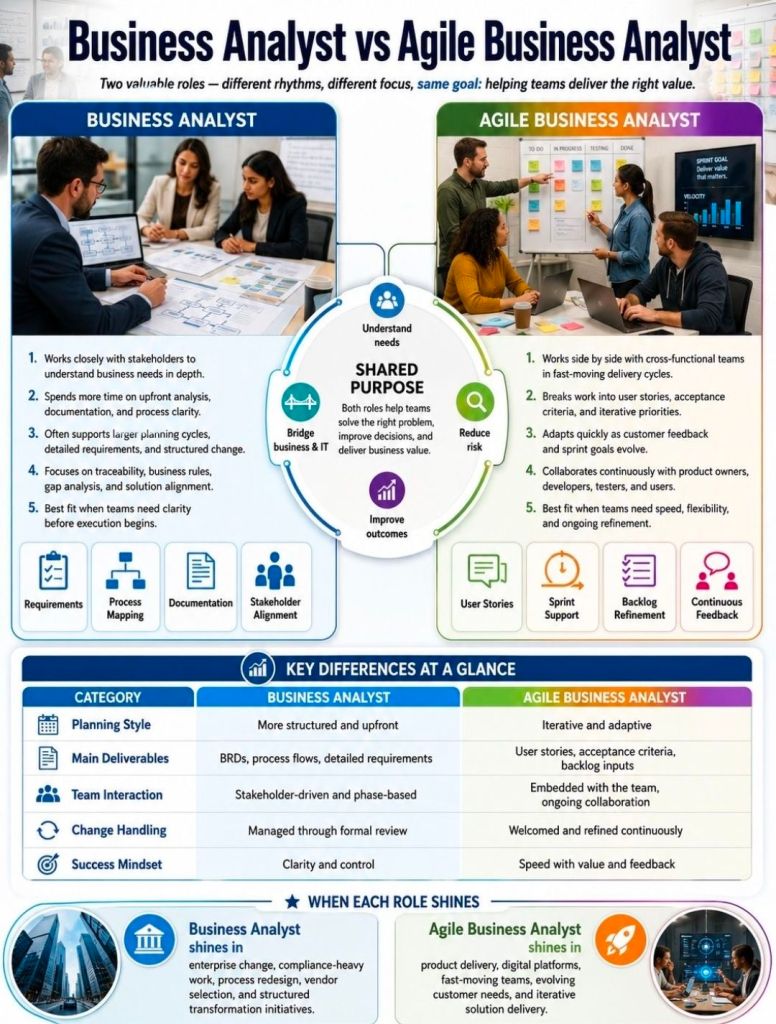
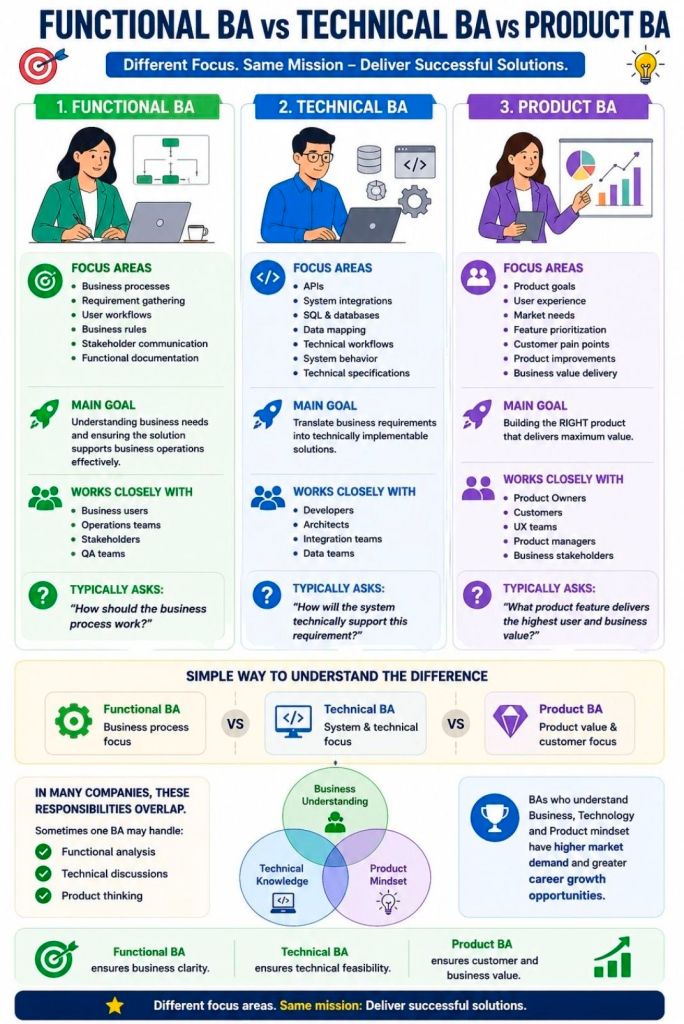
While all three roles fall under the “Business Analyst” umbrella, they differ in their primary focus: Functional BAs translate business needs into user requirements, Technical BAs focus on system architecture and integration, and Product BAs drive the product’s market value and long-term strategy.
1. Functional BA (The ‘Business’ Translator)
The Functional BA acts as the primary bridge between business stakeholders and the IT delivery team. They focus on what the business needs to achieve and how users will interact with the system.
Core Focus: Business processes, stakeholder communication, and end-user experience.
Day-to-day Responsibilities: Gathering requirements, mapping out user journeys, defining acceptance criteria, and creating process flow diagrams.
Key Skills: Stakeholder management, requirements elicitation, and deep domain knowledge (e.g., finance, healthcare).
2. Technical BA (The ‘System’ Architect)
The Technical BA bridges the gap between the functional requirements and the software development team. They focus on how the system will be built, ensuring the proposed solution is technically feasible, scalable, and secure.
Core Focus: System architecture, data flow, integrations, and non-functional requirements (like performance).
Day-to-day Responsibilities: Defining API structures, mapping data models, documenting system interfaces, and writing complex technical user stories.
Key Skills: Understanding of system integrations, database structures, basic coding logic, and system-to-system communication.
3. Product BA (The ‘Value’ Strategist)
The Product BA merges business analysis with product management principles. Rather than just fulfilling requested requirements, they focus on why a product or feature should be built, ensuring it aligns with overarching company goals and delivers tangible ROI.
Core Focus: Product strategy, feature prioritization, market viability, and user adoption.
Day-to-day Responsibilities: Conducting market research, managing the product backlog, defining Key Performance Indicators (KPIs), and analyzing user feedback/metrics.
Key Skills: Product discovery, data analysis, competitive analysis, and strategic roadmapping.
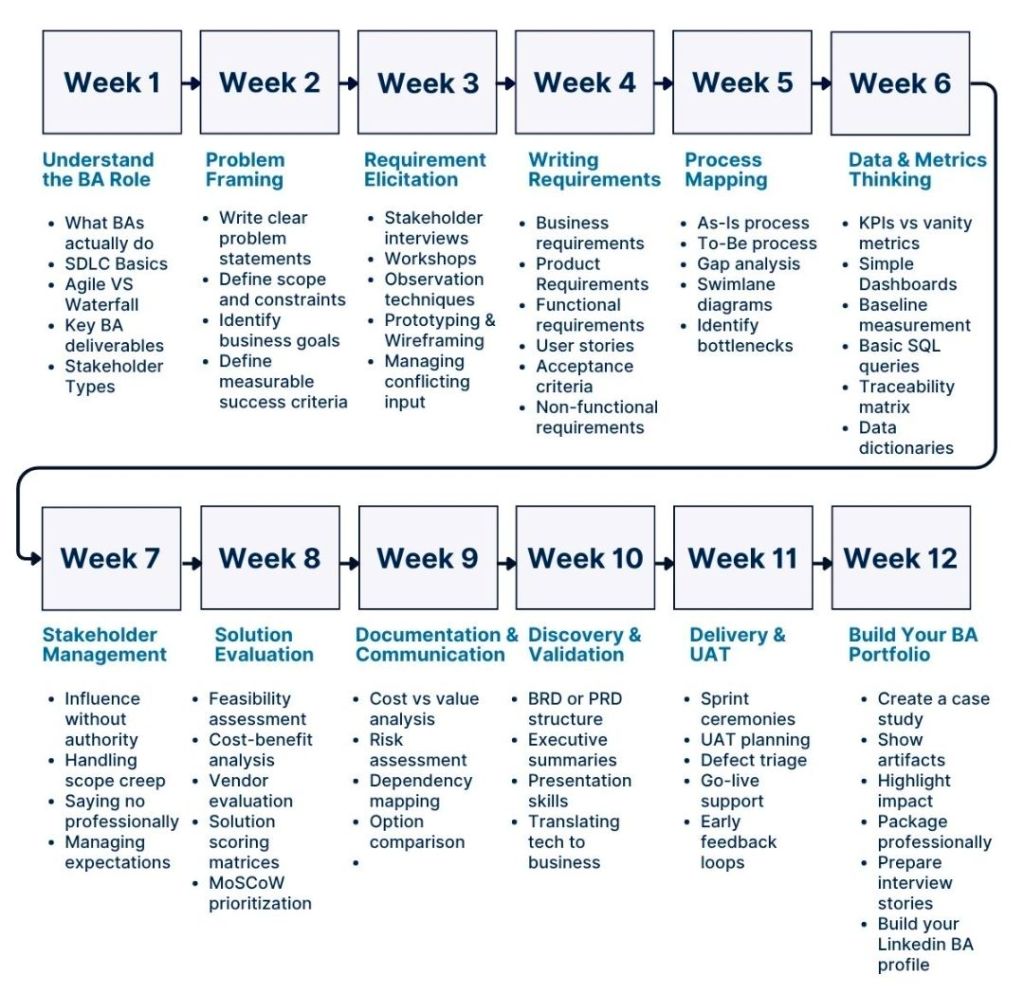
Business Analysis (BA) from week to week, across an example project
Another example;
Business Analysis (BA) across an example project—like building a custom mobile app—follows a dynamic, week-to-week lifecycle. It shifts focus from initial high-level strategy and stakeholder alignment to granular requirements, testing support, and post-launch evaluation.
Here is how a typical BA lifecycle breaks down across an example 8-week project timeline:
Week 1: Project Kickoff & Discovery
Focus: Understanding the business problem and setting boundaries.
Activities:
Facilitating kickoff workshops with key stakeholders.
Creating a Business Case or Vision Document to define the “why.”
Identifying key project sponsors, users, and subject matter experts (SMEs).
Week 2: Stakeholder Engagement & Elicitation
Focus: Extracting needs from the people who matter.
Activities:
Conducting interviews, surveys, and Focus Groups to gather initial wants and needs.
Mapping out high-level Business Processes (current “As-Is” workflows and future “To-Be” workflows).
Week 3: Analysis & Requirements Definition
Focus: Turning raw data into structured requirements.
Activities:
Writing user stories and establishing Acceptance Criteria (often using the Given-When-Then format).
Creating documentation like process models, wireframes, and data dictionaries.
Week 4: Prioritization & Scope Management
Focus: Deciding what gets built first.
Activities:
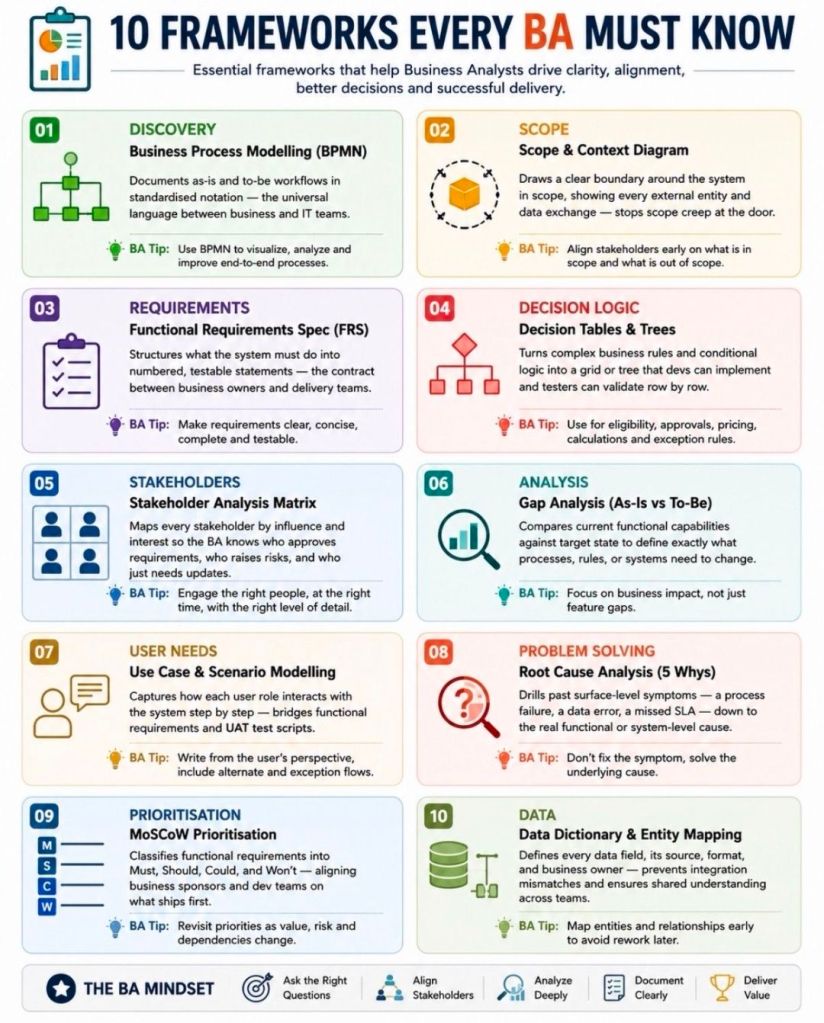
Facilitating prioritization sessions using frameworks like the MoSCoW Method (Must have, Should have, Could have, Won’t have).
Defining the Minimum Viable Product (MVP) to prevent scope creep.
Week 5: Backlog Refinement & Solution Design
Focus: Preparing work for the development team.
Activities:
Refining the product backlog alongside the Product Owner.
Working directly with UI/UX designers and technical architects to ensure designs align with business rules.
Week 6: Development Support & Clarification
Focus: Answering daily questions and unblocking the team.
Activities:
Hosting Agile ceremonies like Sprint Planning and Daily Stand-ups.
Clarifying edge cases and adjusting requirements if technical constraints arise during development.
Week 7: Testing & Validation
Focus: Ensuring the solution works and meets business needs.
Activities:
Assisting Quality Assurance (QA) teams by explaining acceptance criteria.
Facilitating User Acceptance Testing (UAT) with real business users to sign off on the software.
Week 8: Deployment & Post-Implementation Review
Focus: Launching the product and measuring success.
Activities:
Helping prepare training materials, user manuals, and release notes.
Conducting a Retrospective to identify process improvements for the next project phase.