Agile, Scrum and SAFe – How the Principles Connect

Agile, Scrum and SAFe - How the Principles Connect
2. Agile, Scrum and SAFe - How the Principles Connect
Agile, Scrum and SAFe –
How the Principles Connect

Comparison Between Load and Capacity in Agile Scrum

In Scrum, capacity represents the total amount of available work time a team has for an upcoming sprint, while load is the actual amount of work the team pulls into that sprint.

1 Comparison Between Load and Capacity in Agile Scrum
2 Comparison Between Load and Capacity in Agile Scrum
Comparison Between Load
& Capacity in Scrum

Understanding Capacity

Capacity acts as your ceiling. It is a forward-looking calculation performed right before sprint planning. It accounts for the reality of the upcoming calendar cycle.

  • To find a team’s capacity, you multiply total working days by the number of team members.
  • You then subtract non-productive time like public holidays, planned vacation days, and standard company meetings.
  • Finally, you apply a focus factor (typically around 70% to 80%) to account for daily distractions and context switching.

Understanding Load

Load represents the weight of the commitments made by the developers. It is the cumulative volume of user stories and tasks that the team intends to deliver during the sprint.

  • Load is entirely determined by how the team estimates the product backlog items pulled into the sprint.
  • Unlike capacity (which is restricted by time), load can theoretically be pushed to any level, though overloading creates major delivery risks.

Balancing the Relationship

The ultimate goal of a Scrum Master is to help the team balance load against capacity to maintain a sustainable pace.

  • The Safe Zone: Best practices dictate keeping your load at 10% to 20% below your absolute capacity. This visual buffer creates room for unexpected blockers or minor illness.
  • The Danger Zone (Overcommitment): An exact match where load equals capacity is considered an anti-pattern in Agile frameworks. It strips the team of flexibility, spikes burnout, encourages poor-quality code, and almost always leads to missed sprint goals.

Comparison Between Load & Capacity in Agile Scrum

Agile Scrum Definition of Done DOD

Agile Scrum Definition of Done DOD

The Definition of Done (DoD) in Agile Scrum is a shared, team-wide checklist of the quality criteria every product backlog item must meet before it can be considered truly complete and releasable. It ensures consistent quality standards and prevents “almost done” work from accumulating as technical debt.

DoD vs. Acceptance Criteria

It is common to confuse the DoD with Acceptance Criteria, but they serve different purposes:

  • Definition of Done: Applies to all product backlog items. It dictates the technical quality standards (e.g., code reviewed, tests passed) required to be releasable.
  • Acceptance Criteria: Specific to an individual user story. It details the unique functional behaviors and business requirements needed to satisfy the user.

Typical DoD Checklist

While the DoD evolves as the team matures, a standard software development checklist often includes:

  • Code written and passes static analysis checks
  • Peer code review completed (Pull Request approved)
  • All unit and automated acceptance tests are written and passing
  • Security and performance checks completed
  • Meets accessibility standards (e.g., WCAG)
  • All necessary documentation (API, release notes, user guides) is updated
  • Deployed to a staging/testing environment

Why the DoD Matters

  • Transparency: Everyone—from developers to stakeholders—knows exactly what “done” means, removing ambiguity.
  • Quality Assurance: Establishes a minimum quality threshold, reducing bugs and future rework.
  • Releasability: Ensures the product increment is genuinely usable and ready to be shipped to end-users.

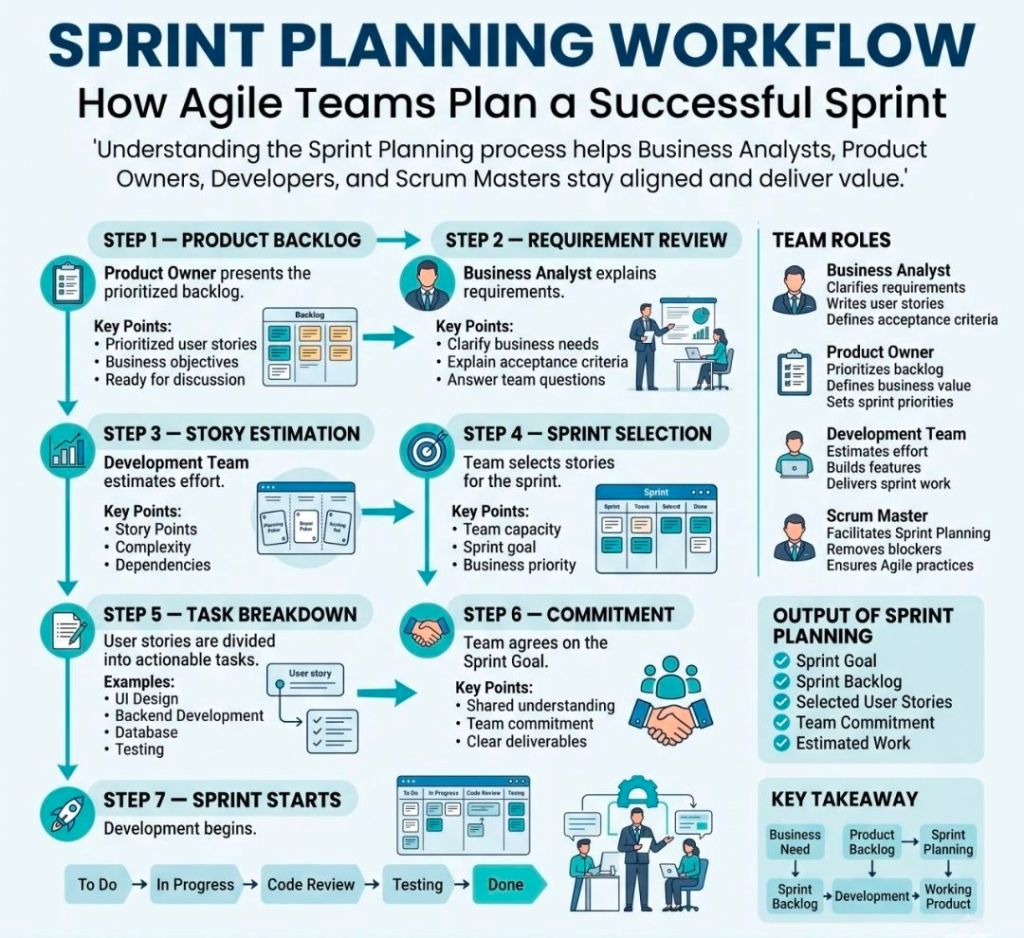
Business Analyst and Sprint Planning focus

Business Analyst and Sprint Planning focus

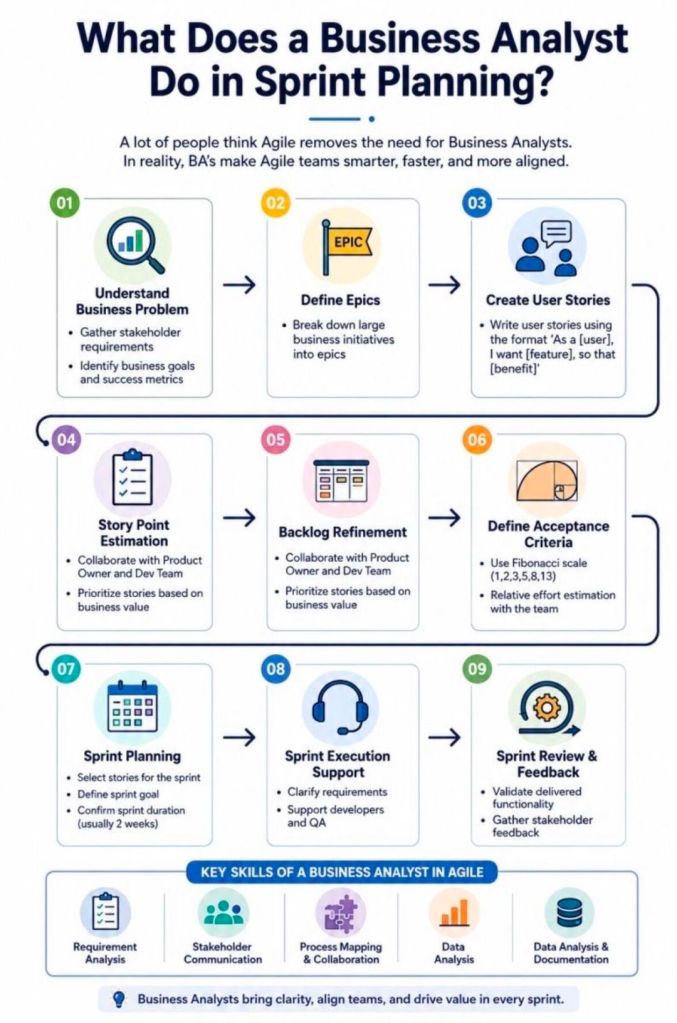
In Agile and Scrum frameworks, the Business Analyst (BA) bridges the gap between high-level business vision and tactical development execution. During Sprint Planning, a BA’s primary focus is to ensure that the development team has absolute requirement clarity, eliminating assumptions before a single line of code is written.

The exact focus areas of an Agile Business Analyst are divided into pre-planning readiness, active session support, and look-ahead risk management.

1. Requirements Readiness (Definition of Ready)

The primary pre-planning objective for a BA is ensuring that the top of the Product Backlog satisfies the team’s “Definition of Ready” (DoR).

  • INVEST Criteria: Verifying that each Product Backlog Item (PBI) is Independent, Negotiable, Valuable, Estimable, Small, and Testable.
  • Acceptance Criteria: Drafting robust, edge-case-tested functional parameters (often using the Given-When-Then format) to govern testing.
  • Business Rules & Models: Mapping complex data models, workflows, and process rules so developers have clear visuals alongside text.

2. Guarding the Business Value and Sprint Goal

While the Product Owner (PO) sets the priority, the BA confirms that the selected sprint backlog items align logically to form a cohesive target.

  • Sprint Goal Formulation: Supporting the PO in defining a functional, clear objective for the iteration rather than a random collection of tickets.
  • Value Justification: Serving as the “voice of the user,” reminding the technical team why a feature is being built and how it affects the end-user journey.

3. Technical and Functional Bridging

During the actual planning meeting, developers break down stories into sub-tasks and estimate effort. The BA provides live context.

  • Assumption Removal: Answering immediate clarifications regarding data constraints, legacy dependencies, or UI expectations.
  • Sizing Support: Assisting the team during story-point estimation by highlighting hidden functional complexities that impact effort.
  • Scope Trimming: Helping break down massive User Stories (Epics) into bite-sized, single-sprint tasks if an item is deemed too large.

4. Dependency and Risk Mitigation

A critical focus for the BA is ensuring the upcoming sprint does not get blocked by outside factors.

  • Cross-Team Alignment: Identifying if a story relies on an API or data feed managed by an external team, ensuring those pieces are unblocked.
  • Non-Functional Requirements (NFRs): Catching frequently missed parameters, such as specific security protocols, compliance standards, or localization requirements, before work kicks off.

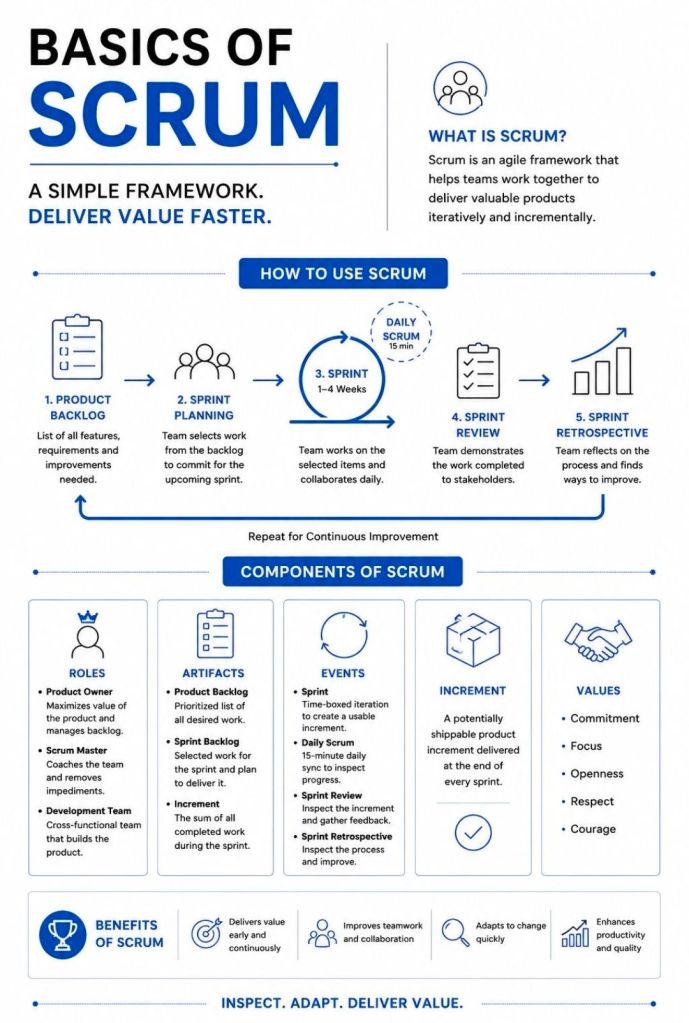
Agile Scrum Artifacts and Commitments

Artifacts and Commitments in Scrum
Scrum Artifacts & Commitments
Agile Scrum Artifacts and Commitments

Agile Scrum vs SAFe (Scaled Agile Framework), Key Differences

Agile Scrum vs SAFe (Scaled Agile Framework), Key Differences
Agile Scrum vs Scaled Agile Framework (SAFe)

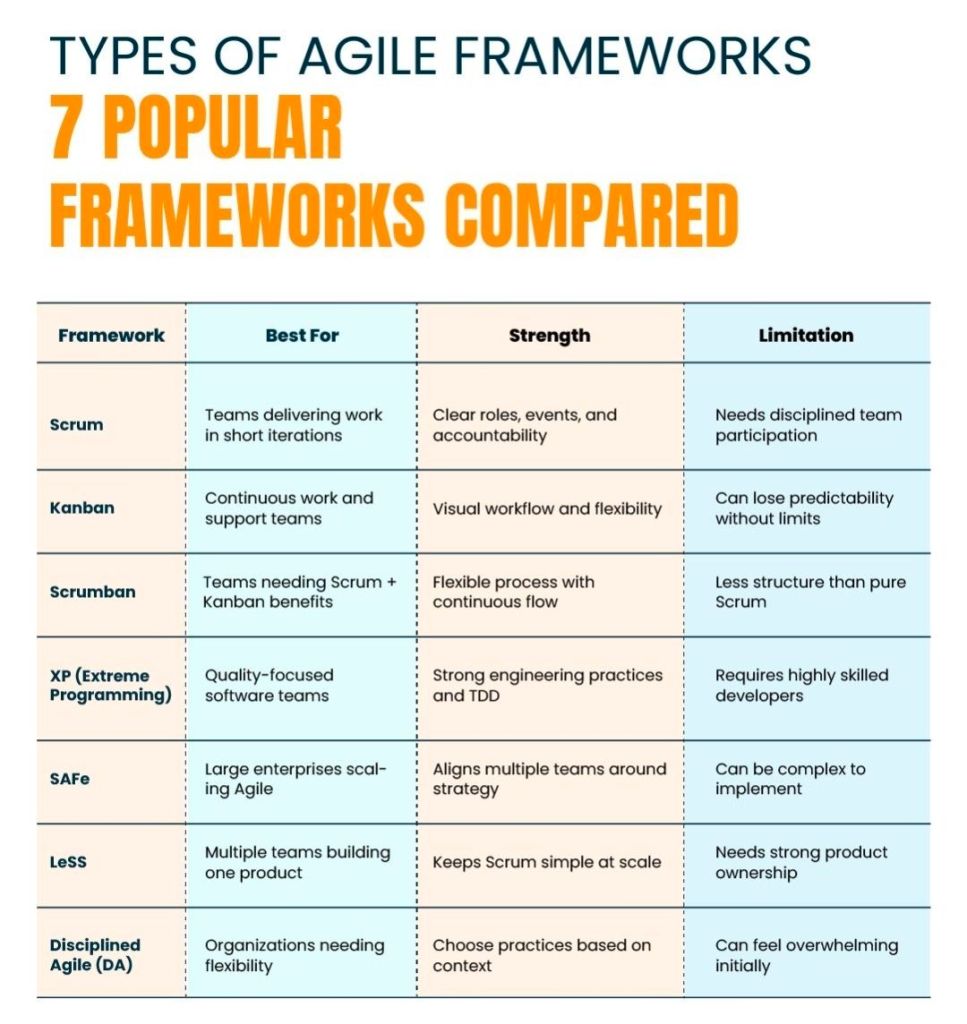
The fundamental difference is scale: Agile Scrum is designed for a single, autonomous team (typically 5–9 people), whereas Scaled Agile Framework (SAFe) is built for the enterprise level to coordinate dozens of teams (50+ people) working toward shared business goals.

Scrum prioritizes team flexibility and speed. Conversely, SAFe trades complete autonomy for centralized alignment, consistency, and structural predictability.

Industry Perspectives on the Trade-offs

While SAFe solves enterprise synchronization challenges, it faces regular scrutiny from product leaders who argue that its highly prescriptive nature can stifle the true spirit of agility.

A popular comment from an agile practitioner on Reddit’s Scrum Community highlights the developer sentiment regarding the process overhead:

“I’ve never seen SAFe implemented without a meeting explosion. More planning, more roles, more acronyms and way more time blocked on calendars.”

Another developer shared a similar perspective on Reddit’s ExperiencedDevs Community:

“Number of meetings have increased 4x. More time is spent for planning to build software than actually building software. Bureaucratic rituals are more important than getting things done.”

Ultimately, SAFe does not replace Scrum. Most organizations implementing SAFe still utilize standard Scrum practices at the team level, leveraging the macro framework solely to manage the dependencies that threaten to derail massive initiatives.


Choosing the Right Approach

  • Choose Scrum if: You have a small or mid-sized setup, your teams operate independently, you are early in your Agile journey, and your primary pain point is a need for fast market-feedback loops.
  • Choose SAFe if: You are coordinating 50 to 1,000+ engineers across complex legacy systems, cross-team dependencies frequently delay your releases, and you need strict regulatory compliance or top-down executive alignment.

Story Mapping in Agile Scrum

Story Mapping in Agile Scrum

Story Mapping in Agile and Scrum is a visual technique that organizes user stories along a chronological user journey. It helps teams see the big picture, avoid flat, disconnected backlogs, and collaborate on planning iterative releases that consistently deliver user value.

How a Story Map is Structured

A story map is a two-dimensional grid—often built with sticky notes on a whiteboard or via software like ⁠Miro or ⁠Visual Paradigm. It breaks work down into three levels of hierarchy:

  • Horizontal Axis (The Spine): Arranges the customer journey chronologically.
    • Activities: The broadest goals a user wants to achieve (e.g., “Checkout”).
    • Steps: The specific tasks required to complete the activity (e.g., “Enter Shipping Info,” “Pay”).
  • Vertical Axis (Details & Priority): Stacks beneath each step are the detailed user stories, epics, or features. They are organized by priority, with the most critical or highly sophisticated tasks at the top.

The Benefits of Story Mapping

Teams use this technique—popularized by Jeff Patton—to achieve several core Agile goals:

  • Prevents “Flat Backlog” Blindness: Gives stakeholders and developers a birds-eye view of how the entire application or feature fits together.
  • Defines the MVP: Allows teams to draw horizontal “release lines” across the map. The items sitting above this line form the barebones “walking skeleton” or Minimum Viable Product (MVP).
  • Aids Sprint Planning: Helps the Product Owner pull well-sequenced, context-aware stories directly into sprint backlogs.
  • Fosters Collaboration: Moves the team away from siloed requirement docs and toward collaborative conversations around actual user behavior.

Agile Scrum Metrics, Inspect, Adapt, Improve

1. Agile Scrum Metrics, Inspect, Adapt, Improve
Scrum Metrics summarised
2. Agile Scrum Metrics, Inspect, Adapt, Improve
Scrum Metrics Overview