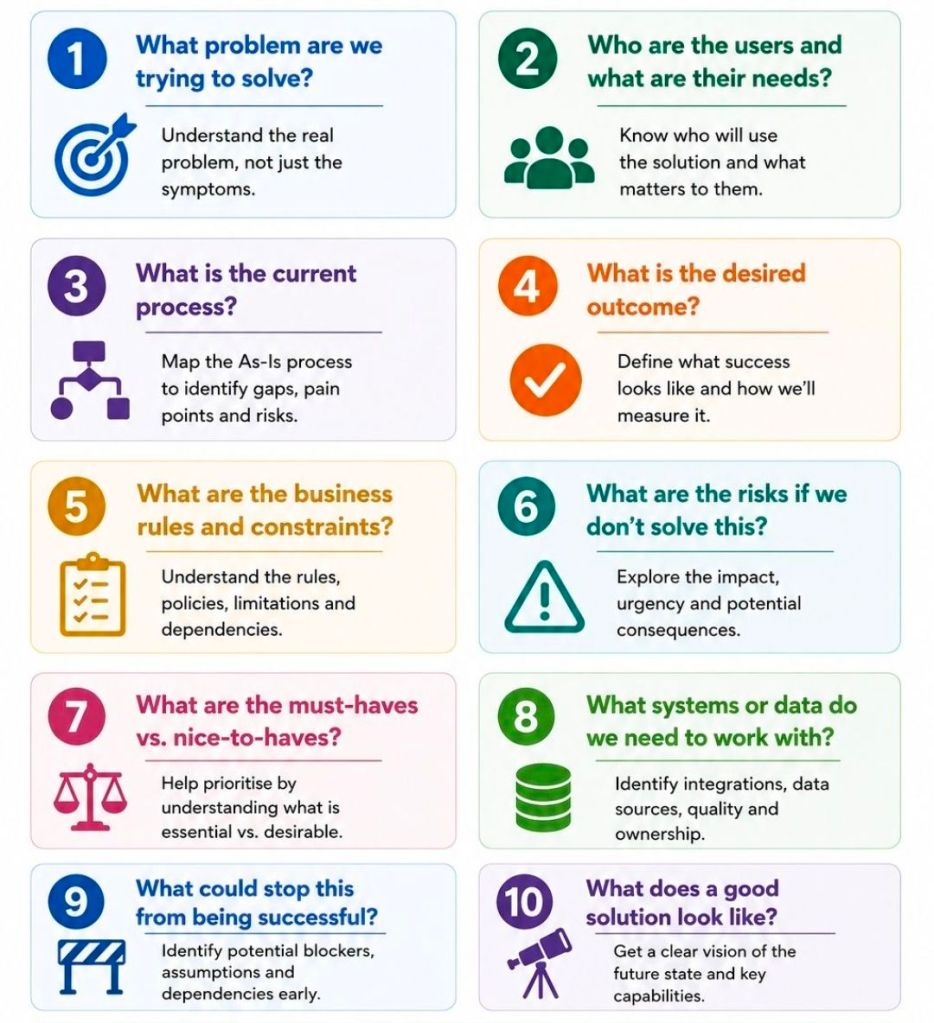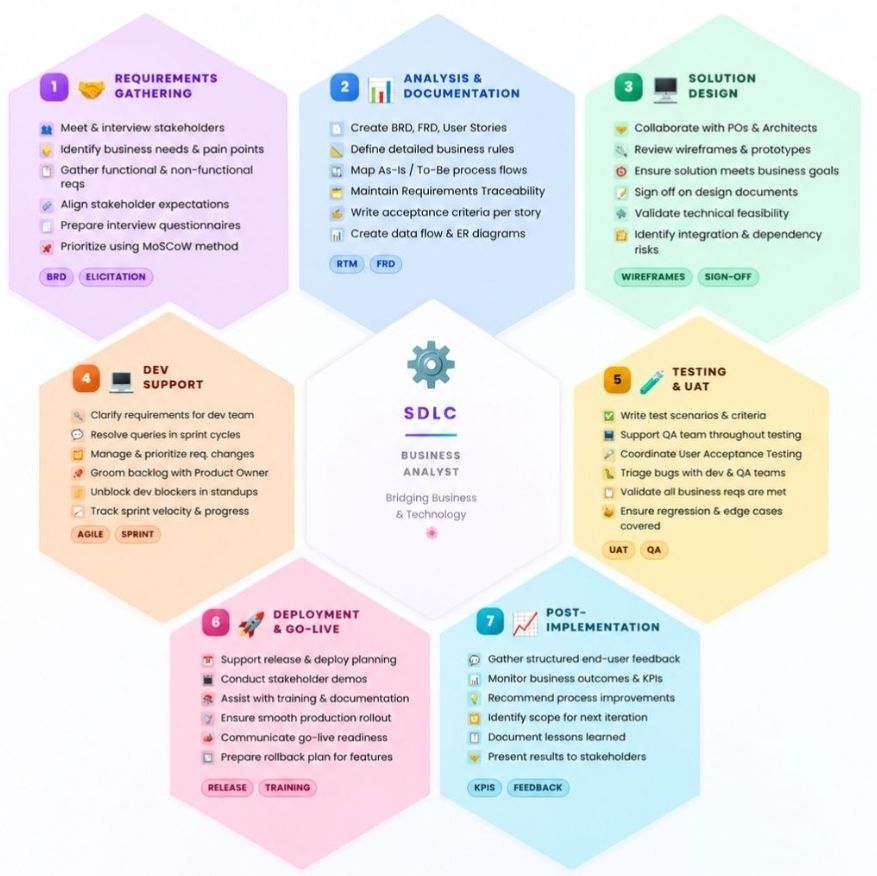
Business Analyst BA Responsibilities Across Software Development Lifecycle SDLC

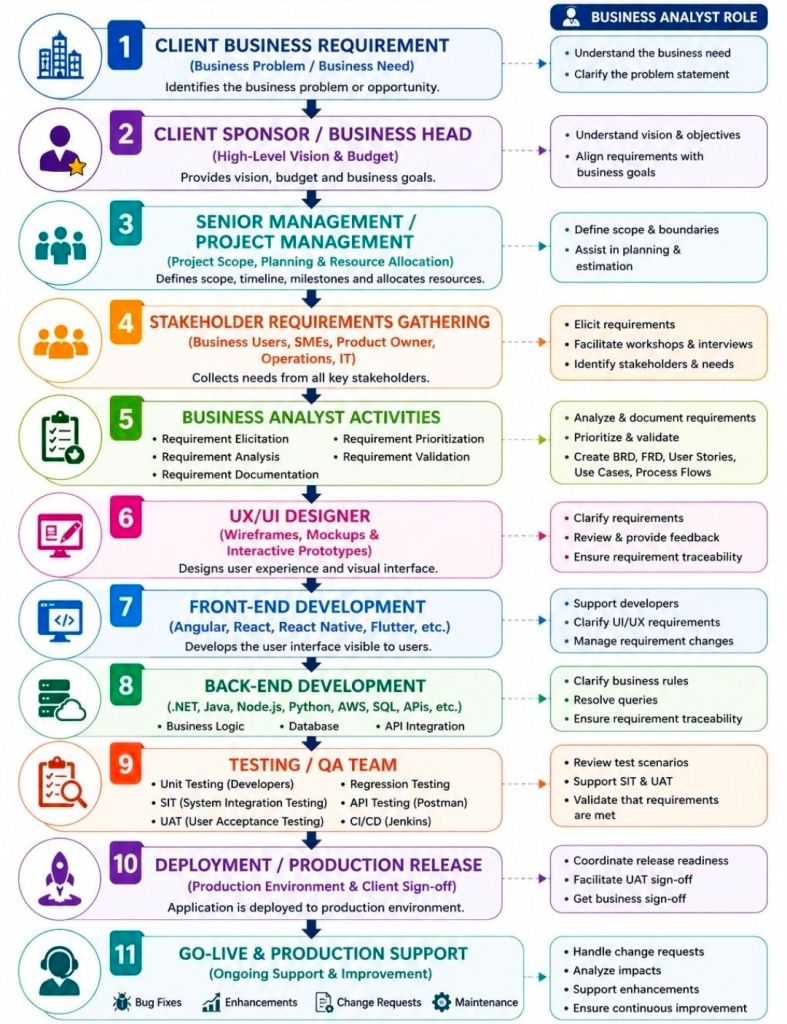
Business Analyst BA Responsibilities Across Software Development Lifecycle SDLC
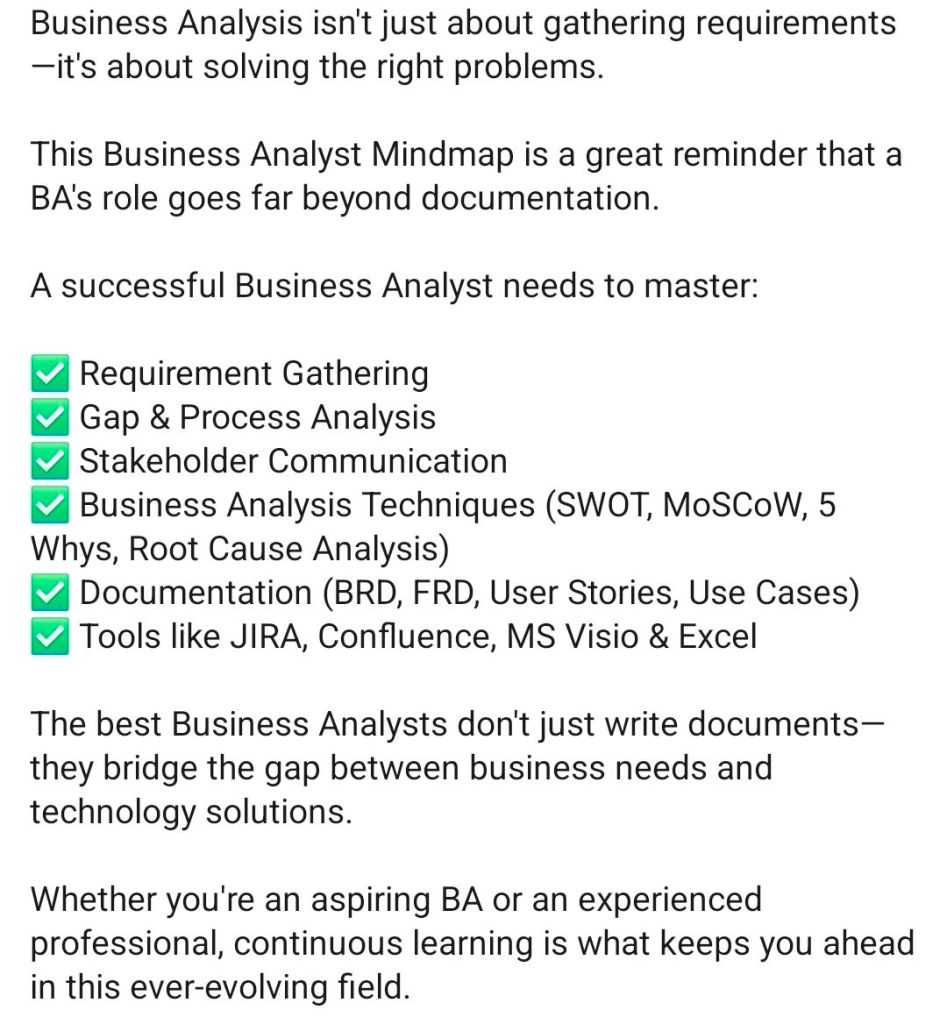
BA Responsibilities Across SDLC
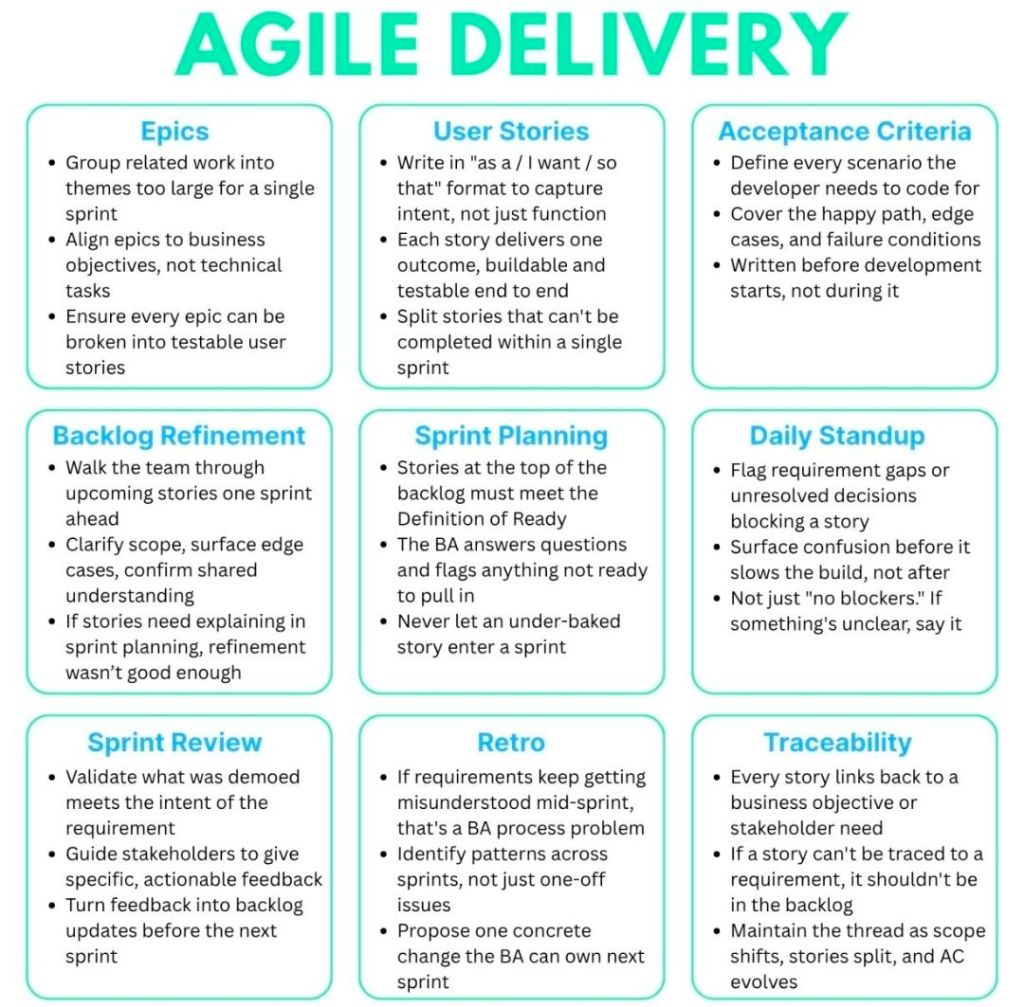
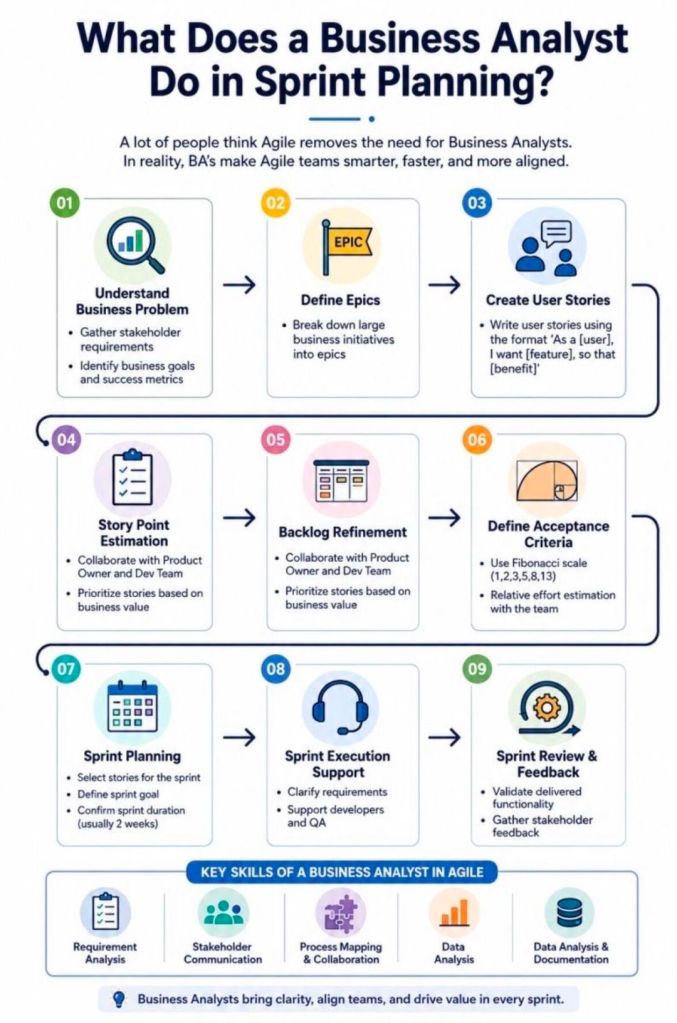
BA Responsibilities in Agile Delivery

Role of a Business Analyst BA in API Integration

Role of a Business Analyst BA in API Integration
Role of a Business Analyst BA
in API Integration

A Business Analyst (BA) acts as the critical bridge between business stakeholders and technical teams. In API integration, the BA translates strategic business goals into clear technical requirements. They ensure systems communicate seamlessly, align with business rules, and support the overall customer journey.

Core responsibilities for a BA in API integration include:

  • Requirement Gathering: Translating business needs into precise functional and non-functional requirements, such as payload data requirements, expected response times, and security protocols.
  • Data Mapping: Defining exactly how data fields correspond across different systems (e.g., matching a CRM’s “Client Name” to a billing system’s “Customer”) and determining data transformation rules.
  • Defining Scenarios: Detailing the API’s behavior for both standard workflows and edge cases, such as handling invalid login attempts, rate limiting, and system timeouts.
  • Documentation & Modeling: Using sequence diagrams and flowcharts to visually map out how systems interact, and producing clear Interface Control Documents (ICD).
  • User Stories & Acceptance Criteria: Writing integration-focused user stories for Agile backlogs, including specific HTTP methods, request/response formats, and error codes.
  • Facilitating Collaboration: Bridging the communication gap by translating technical constraints to non-technical stakeholders and business objectives to developers.
  • Testing & UAT Support: Assisting the QA team in validating API endpoints using tools like Postman, and ensuring requirements are met during User Acceptance Testing (UAT).

To deepen your understanding of this role, comprehensive guidelines and methodologies can be explored via LinkedIn’s API for Analysts or Business Analyst Community Integration Guides.

Role of a Business Analyst BA in API Integration

API (Application Programming Interface) for Business Analysts BA

An API (Application Programming Interface) is a set of rules that lets different software programs communicate and share data with each other. Think of it like a waiter in a restaurant: you (the application) place an order (a request), and the waiter takes it to the kitchen (the server) and brings back exactly what you asked for.

API Application Programming Interface for Business Analysts BA
API (Application Programming Interface)
for Business Analysts BA

How They Work

  • The Request: One program asks another for specific data or actions using an API call.
  • The Rules: The API dictates exactly how this request must be formatted to ensure security and consistency.
  • The Response: The receiving program processes the request and sends the requested information or executes the task.

For business analysts (BAs), APIs are crucial business enablers that connect systems, automate workflows, and drive revenue. Categorizing APIs helps BAs identify technical impacts, scope integration requirements, and align solutions with strategic business goals.

Categorization can be divided into three primary frameworks: Access Level, Business Purpose, and Architecture Style.

1. By Access Level (Audience)

This categorization defines who has permission to use the API and dictates security requirements.

  • Internal (Private) APIs: Developed by a company strictly for internal use. These connect backend systems (e.g., a CRM talking to an ERP) or allow different internal departments to share data securely.
  • Partner APIs: Shared specifically with external business partners or vendors. These require strict authentication and agreements to streamline supply chain or B2B operations (e.g., granting a distributor inventory access).
  • Public (Open) APIs: Exposed to developers and the general public to foster third-party integrations, app development, or ecosystem growth. They often require an API key or OAuth for tracking usage.

2. By Business Purpose (API-led Connectivity)

This approach, often used in integration methodologies like MuleSoft, categorizes APIs by their role in the enterprise architecture.

  • System APIs: Unlock data directly from core systems of record (e.g., a legacy database, an ERP, or a billing system).
  • Process APIs: Interact with and shape data across multiple systems to break down data silos (e.g., an API that takes order fulfillment data and formats it for shipment and inventory updates).
  • Experience APIs: Provide a business context for the data to be easily consumed by end-user interfaces like mobile applications, web portals, or chatbots (e.g., fetching a 360-degree customer view).

3. By Architecture Style (Technical Format)

While solution architects define the exact protocol, BAs must understand these styles to document data flow, map payloads, and communicate limitations with developers.

  • REST (Representational State Transfer): The most common web API standard. It uses HTTP methods to transfer data in simple formats like JSON.
  • SOAP (Simple Object Access Protocol): An older, highly structured protocol heavily used in enterprise and highly regulated industries (like banking and healthcare).
  • GraphQL: A query language for APIs that allows the client (e.g., a mobile app) to request exactly the specific data it needs, rather than fetching entire datasets.
  • Webhooks: Automated, event-driven APIs. Rather than a client requesting data, the server “pushes” data to the client the moment a specific event happens (e.g., sending a receipt to an app the instant a payment clears).
API Architecture Styles

Key API Concepts for BAs

Business analysts rarely build APIs, but they must understand high-level concepts to document API requirements effectively:

  • Payload: The data that is being sent (Request) or received (Response).
  • CRUD / HTTP Methods: The basic actions mapped to data. BAs need to understand GET (Read), POST (Create), PUT/PATCH (Update), and DELETE (Remove).
  • Status Codes: Standardized numbers that indicate the result of a request (e.g., 200 for success, 404 for not found, or 500 for server error).
  • Documentation: BAs use standards like Swagger/OpenAPI to interpret how an API should behave.
Status Codes, Standardized numbers that indicate the result of a request (e.g., 200 for success, 404 for not found, or 500 for server error)
API Status Codes – standardized numbers
that indicate the result of a request

API (Application Programming Interface) for Business Analysts BA

Planning Phase Business Analyst BA Deliverables

Planning Phase Business Analyst BA Deliverables

In the project planning phase, a Business Analyst (BA) focuses on establishing the project’s strategic alignment, defining the baseline scope, mapping stakeholders, and structuring the business analysis methodology.

The critical BA deliverables generated during this phase ensure clarity and alignment across technical and business teams before execution begins.

Strategic & Scope Foundations

  • Business Problem Statement: Defines the core issue being addressed, why it matters to the organisation, and the downstream impact if no action is taken.
  • Business Case: Outlines the shortlisted, viable operational choices alongside a comprehensive cost-benefit analysis to justify financial investment.
  • Project Vision & Scope: A high-level description outlining system boundaries, project objectives, and structural constraints to prevent eventual scope creep.

Stakeholder & Communication Frameworks

  • Stakeholder Map: Visually identifies all internal and external parties who are involved in, impacted by, or influential to the initiative.
  • Stakeholder Analysis Matrix: Assesses stakeholder interest and decision-making power to customize communication and engagement strategies.
  • Business Glossary: A standardized registry defining critical business terminology to maintain consistent vocabulary across different teams.

Process & Data Models

  • Current State Discovery (“As-Is” Models): A structured overview detailing exactly how today’s workflows, processes, and operating models currently function.
  • High-Level Context Diagram: Maps the structural boundaries of the proposed project, showing how the internal system will interact with external users and data systems.
  • Data Flow Diagram (DFD): Illustrates how information travels visually across different processes, storage points, actors, and functional areas.

BA Execution Planning

  • Business Analysis Approach: Outlines the core delivery methodology (e.g., Predictive/Waterfall or Adaptive/Agile), specifying the timelines, techniques, and governance processes to be used.
  • Requirements Management Plan: Defines the tools for managing requirements, access protocols, configuration control, and how changes to the baseline will be systematically approved.

Facilitating Workshops as a Business Analyst BA

Facilitating Workshops as a Business Analyst BA
Facilitating Workshops as a Business Analyst
Facilitating Workshops as a Business Analyst BA

As a Business Analyst (BA), facilitating workshops is a core competency used to elicit requirements, align cross-functional teams, and achieve stakeholder consensus. Success hinges on meticulous pre-session planning, active moderation of group dynamics during the session, and timely post-workshop documentation.

A proven framework for facilitating impactful BA workshops involves three critical phases:

1. Preparation

Planning is the most important step for a successful workshop. Poorly planned sessions waste valuable stakeholder time.

  • Define the Objective: Identify exactly what needs to be achieved (e.g., process mapping, feature prioritization, or user story mapping).
  • Select Participants: Invite subject matter experts (SMEs), decision-makers, and end-users. Keep the group size manageable, usually between 5 to 10 people to ensure productivity.
  • Create a Clear Agenda: Break the time down into specific activities. Allocate time for introductions, the core activity, breaks (if >1 hour), and a summary.
  • Prepare Materials: Set up whiteboards (physical or digital like Miro/Mural) and prepare your facilitation techniques (e.g., brainstorming, MoSCoW prioritization).

2. Execution (In the Session)

Your role is to act as a neutral guide, keeping the team focused on the objective rather than getting bogged down in implementation details.

  • Set Ground Rules: Establish parameters early, such as one conversation at a time, keeping devices put away, and respecting everyone’s input.
  • Manage Group Dynamics: Encourage quieter participants to speak up while politely reigning in dominant voices.
  • Use a ‘Parking Lot’: Create a designated section on a whiteboard for off-topic ideas, out-of-scope concerns, or unresolved questions to prevent the meeting from derailing.
  • Visual Collaboration: Use process flows, mockups, or sticky notes to give the conversation a focal point. This triggers ideas and helps maintain stakeholder attention.

3. Post-Workshop

The work doesn’t end when the meeting concludes. You must synthesize the information gathered to ensure it translates into actionable project deliverables.

  • Consolidate Documentation: Clean up notes, digitize whiteboard sessions, and format the elicited requirements.
  • Distribute and Align: Send a clear, written summary to participants outlining decisions made, parking lot items that need resolution, and agreed-upon next steps (who is doing what and by when).

Resources and Best Practices

  • For structured, globally recognized techniques and study material, explore the International Institute of Business Analysis (IIBA).
  • To learn practical workshop formats like user story mapping and discovery, watch this BA Requirements Workshop Guide on YouTube.

Agile for Business Analysts BA

Agile for Business Analysts BA

In an Agile environment, a Business Analyst (BA)acts as the crucial bridge between business stakeholders and the technical team. Rather than gathering all requirements upfront, Agile BAs focus on continuous analysis, delivering value in small increments, and writing lightweight user stories that adapt as the product evolves.

Transitioning from traditional (Waterfall) analysis to an Agile framework requires a fundamental shift in how requirements are handled, documented, and delivered.

The Core Shifts in an Agile BA Role

  • Continuous Discovery: Instead of producing a massive Requirements Document at the start, BAs analyze and refine requirements just-in-time and just-enough to keep the development team moving.
  • User Stories over BRDs: Traditional Business Requirements Documents (BRDs) are replaced with collaborative user stories and acceptance criteria.
  • Value-Driven Prioritization: The BA continuously helps the Product Owner (or acts as the Product Owner proxy) rank the Product Backlog so that the highest-value features are built first.
  • Shared Understanding: The focus is on face-to-face communication, workshops, and visual modeling (like wireframes) to ensure developers fully grasp what needs to be built.

Key Responsibilities

Agile BAs operate across several domains throughout the sprint lifecycle:

  1. Backlog Refinement: Collaborating with stakeholders to break down large, complex requirements into smaller, manageable chunks (Epics to User Stories).
  2. Definition of Ready (DoR): Ensuring that user stories are clear, testable, and have defined acceptance criteria before they are pulled into an active sprint.
  3. Sprint Support: Answering questions from the development team in real-time, clarifying business rules, and helping to remove blockers.
  4. Acceptance Testing: Assisting Quality Assurance (QA) teams or business users to validate that the delivered software works as intended and solves the underlying business problem.
Agile BA versus Traditional BA

Common Frameworks for Agile BAs

  • Scrum: Working alongside the Scrum Master, Product Owner, and Developers in short iterations (sprints), typically lasting 2 to 4 weeks.
  • Kanban: Managing a continuous flow of analysis work, prioritizing items on a visual board as development capacity allows.
  • AgileBA: A specific certification and framework designed by the Agile Business Consortium that provides BAs with practical tools for working in Agile settings.

Recommended Resources for Skill Building

To deepen your expertise in Agile business analysis, explore these highly regarded methodologies and guides:

  • Use the AgileBA Certification guide to understand official best practices.
  • Read the IIBA Agile Extension to the BABOK Guide for authoritative frameworks.
  • Review Bridging the Gap for practical, real-world implementation strategies.

Requirements Traceability Matrix RTM & Business Analyst BA

Requirements Traceability Matrix RTM & Business Analyst BA

A Requirements Traceability Matrix (RTM) is a structured project management document that links user and stakeholder requirements directly to their corresponding design elements, development deliverables, and verification test cases.

Acting as a living checklist throughout the project life cycle, its primary purpose is to ensure 100% test coverage, validate that all client requests are fulfilled, and prevent scope creep by identifying undocumented work.

The visual layout of a typical RTM template maps individual requirement rows against critical validation milestones.

🔄 Three Main Types of Traceability

The configuration of an RTM depends heavily on the direction of tracking needed for the project:

  • Forward Traceability: Tracks requirements forward into design, code, and test cases. It ensures the project executes every requested feature and that nothing gets left behind.
  • Backward (Backward-Looking) Traceability: Traces test cases and final deliverables back to the original requirement. It checks for scope creep, confirming that no extra, unauthorized features were added.
  • Bidirectional Traceability: Combines both approaches. It links requirements from origin to destination and vice versa, providing clear visibility during change management or troubleshooting.

📋 Structured Breakdown of RTM Content

A standard RTM is formatted as a multidimensional table. Below is the foundational structure, broken down into its logical data components:

1. Core Requirement Parameters

  • Requirement ID: A distinct alphanumeric identifier (e.g., REQ-001, BRD-102) for quick cross-referencing.
  • Requirement Type: Classifies the item (e.g., Business, Functional, Technical, UI, Security, or Regulatory Compliance).
  • Requirement Description: A concise textual explanation defining exactly what the feature or system must achieve.
  • Source/Origin: The document, stakeholder, client request, or meeting minutes where the requirement originated.
  • Priority Level: The urgency ranking of the item, usually categorized as High, Medium, or Low (or via MoSCoW ranking).

2. Design and Development Artifacts

  • Functional Specification ID: Links the requirement to the specific section of the functional design document.
  • Technical Design/Architecture Module: Points to the code packages, database tables, or system architectural components implementing the requirement.

3. Verification & Validation (Testing) Data

  • Test Case ID: The unique ID of the specific test cases designed to validate the feature (e.g., TC-101, TC-102).
  • Test Case Description/Objective: A snapshot of what the test case actually checks.
  • User Acceptance Testing (UAT) ID: Specific ID linking to end-user validation scenarios.

4. Execution & Quality Control Tracking

  • Test Execution Status: The real-time health indicator of the testing suite (e.g., Passed, Failed, Blocked, Not Run).
  • Defect/Bug ID: If a test fails, this column logs the active issue tracker ID (e.g., Jira ticket BUG-404) linked to the breakdown.
  • Current Deployment Status: Defines the project readiness stage (e.g., In Progress, Dev, QA, Production).

💡 Core Benefits of Maintaining an RTM

  • Prevents Missed Features: Verifies that every business requirement translates into clean code and valid testing cycles before software deployment.
  • Streamlines Change Management: If a client alters a feature, developers can quickly scan the RTM row to see exactly which code modules and test scripts need updates.
  • Simplifies Compliance Audits: Serves as regulatory proof in safety-critical landscapes (like medical devices or automotive software) that every target function passed validation.

Requirements Traceability Matrix RTM & Business Analyst BA

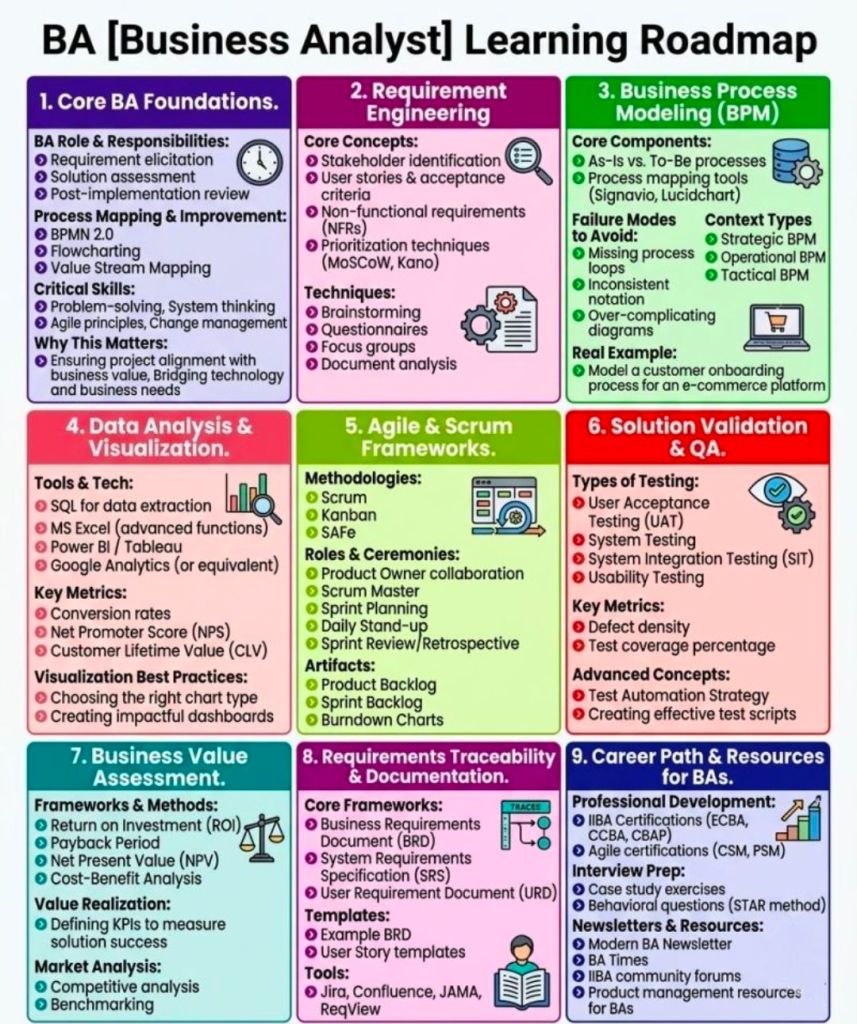
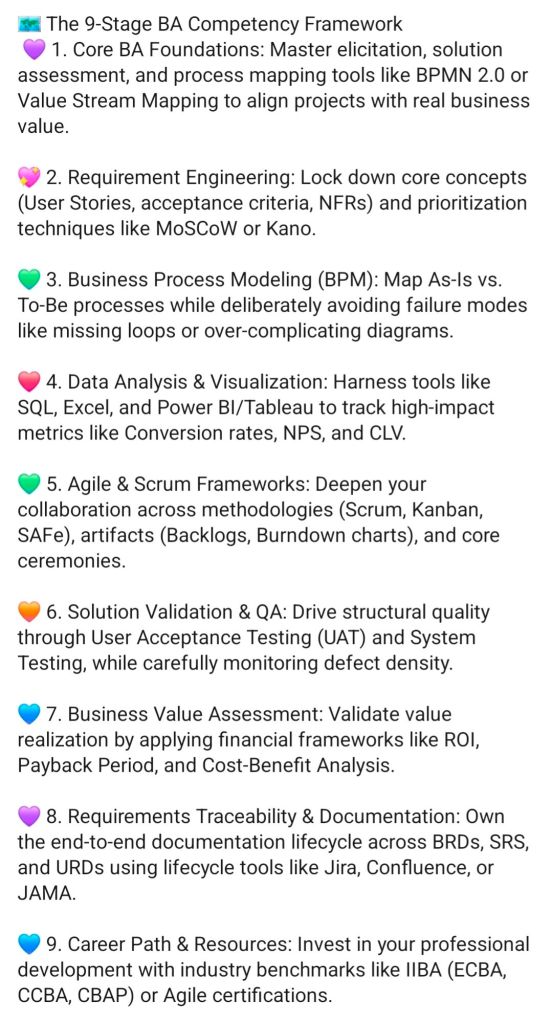
Frameworks for Business Analysts BAs

Frameworks for BA Business Analysts BAs
Frameworks for Business Analysts BAs