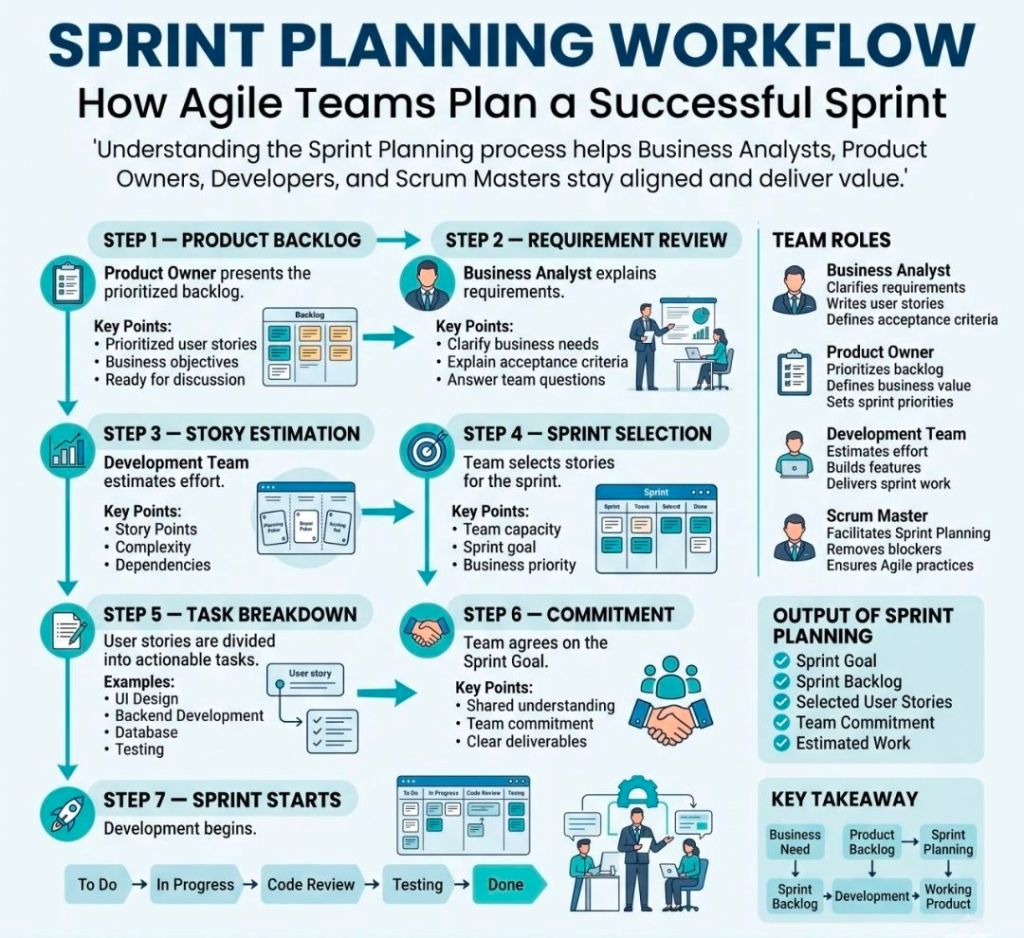
Agile Scrum Story Point Estimation Simplified

Scrum Story Point Estimation Simplified
Agile Scrum Story Point
Estimation Simplified

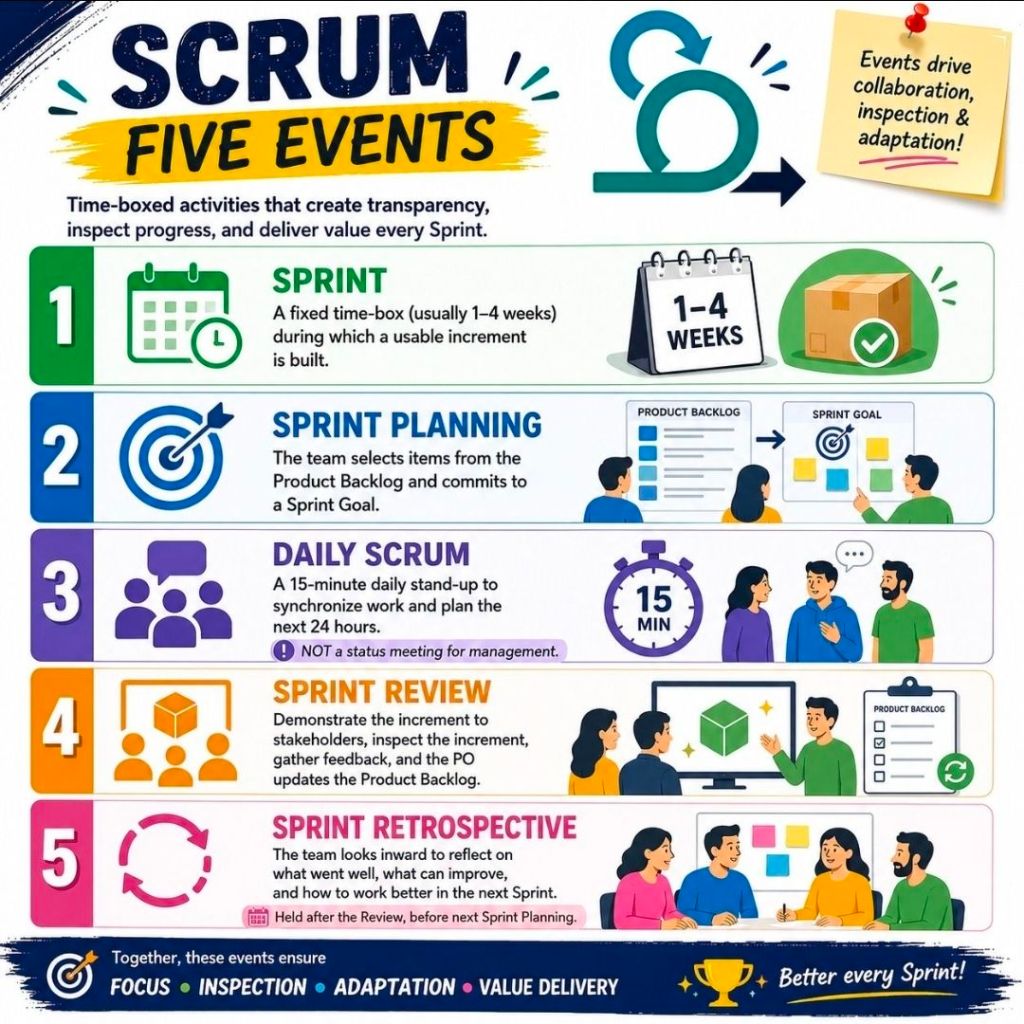
Agile Scrum Five Events

1. Agile Scrum Five Events
2. Agile Scrum Five Events
Agile Scrum Five Events

In Jira Software, an Agile workflow is the sequential path a work item follows

In Jira Software, an Agile workflow is the sequential path a work item follows from creation to completion. It maps out your team’s real-world processes onto a digital Jira Board, ensuring full transparency, accountability, and tracking during iterative cycles.

Whether your team uses the structured Scrum framework or the continuous delivery of Kanban, the core workflow engine runs on the same underlying components.


Core Components of a Jira Workflow

Every workflow in Jira is built using three essential pillars:

  • Status: This indicates exactly where a task sits in the process cycle (e.g., “To Do”, “In Progress”, “In Review”).
  • Transition: The one-way link or action taken to move an issue from one status to another (e.g., clicking “Start Progress” or dragging a card).
  • Resolution: The ultimate reason why a task is closed (e.g., “Done”, “Fixed”, “Duplicate”, “Won’t Do”).

The Standard Agile Workflow Stages

By default, Jira uses a simplified three-step framework, but high-performing Agile teams usually build out custom statuses to mirror their cross-functional pipelines. A comprehensive Agile software workflow typically looks like this:

1. The Backlog

The master list where the Product Owner documents all upcoming feature requests, bugs, and requirements. Work here is represented as Epics (large bodies of work) and User Stories (smaller, user-focused features). Items sit here until they are prioritized and pulled into active development.

2. To Do (Selected for Development)

Issues committed to the current active iteration—like a 2-week Sprint in Scrum. These items are assigned to specific team members, estimation points are locked in, and they sit in the queue waiting for a developer to pick them up.

3. In Progress

The work is actively being executed. In software teams, moving a card to “In Progress” frequently triggers background Atlassian Automations, such as linking the Jira task to a live branch in a code repository like Bitbucket.

4. In Review / QA

The work is complete but requires validation. This stage is critical for peer code reviews, automated builds, and quality assurance testing. If a bug is caught, a transition can send the issue back to “In Progress”.

5. Done

The work successfully meets the team’s shared “Definition of Done” and is ready for release. Moving a card to this final column automatically strikes through the issue key, triggering a status of “Resolved”.

Structuring Work Across Frameworks

Scrum Workflows: Heavily time-boxed. Issues move sequentially from a groomed backlog into active sprints. Progress and performance metrics are measured via built-in Jira Agile Reports like Burndown Charts and Velocity tracking.

Kanban Workflows: Focused on continuous, fluid delivery. Instead of sprints, teams place Work in Progress (WIP) limits on individual columns. This visually exposes system bottlenecks immediately if too many tasks stack up in a column like “In Review”.

Workflow Best Practices for Teams

  • Keep it Simple Early On: Start with minimal statuses (To Do, In Progress, Done). Only introduce custom steps like “Design” or “UAT” when your team physically hits a communication gap.
  • Leverage Transitions Wisely: Define whether an issue can transition “From Any Status” or must follow a strict, linear progression.
  • Automate Repetitive Steps: Set up rules to auto-assign tasks when they change hands, or auto-close parent User Stories once all child subtasks hit “Done”.

In Jira Software, an Agile workflow is the sequential path a work item follows from creation to completion

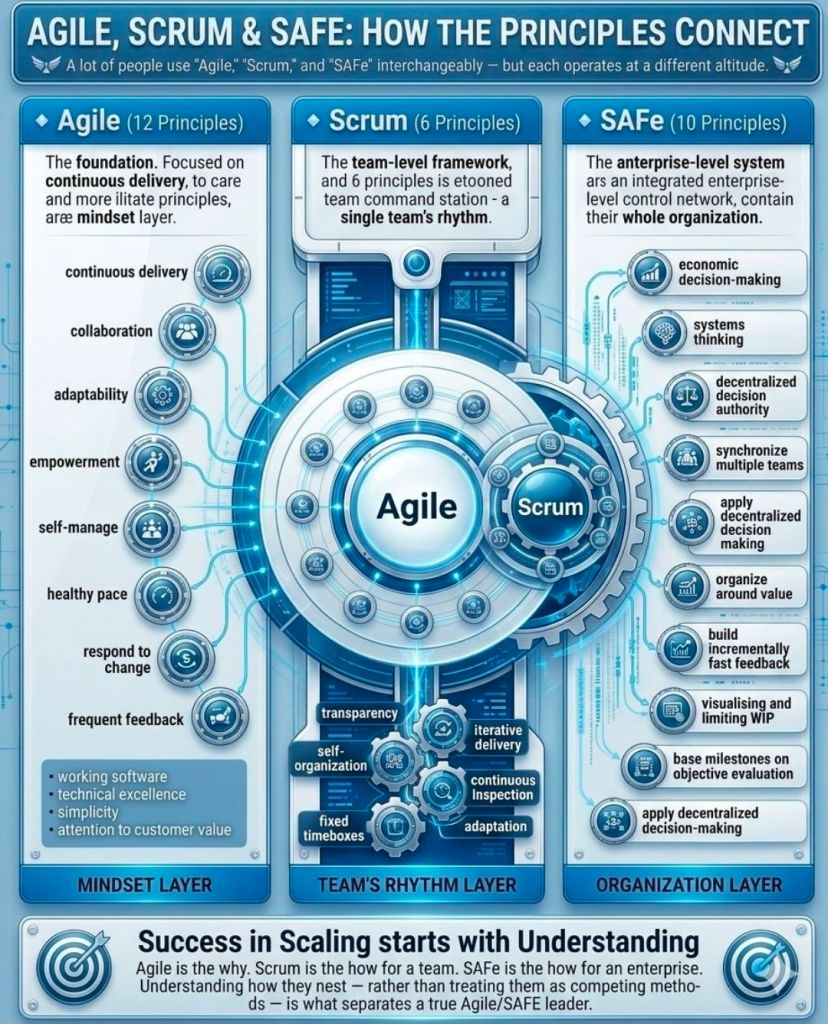
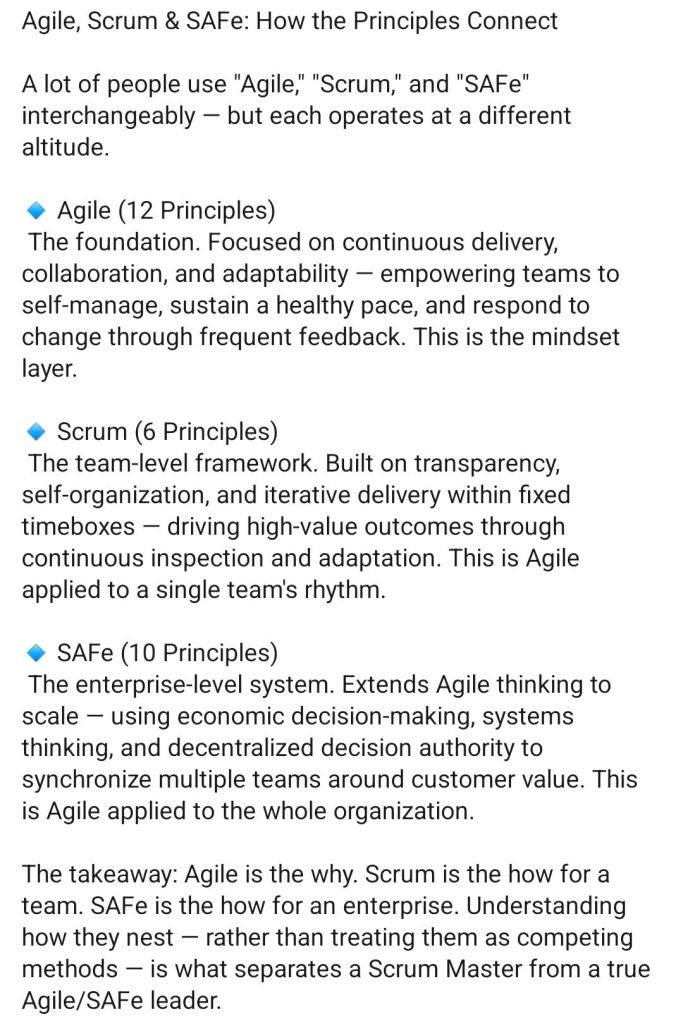
Agile, Scrum and SAFe – How the Principles Connect

Agile, Scrum and SAFe - How the Principles Connect
2. Agile, Scrum and SAFe - How the Principles Connect
Agile, Scrum and SAFe –
How the Principles Connect

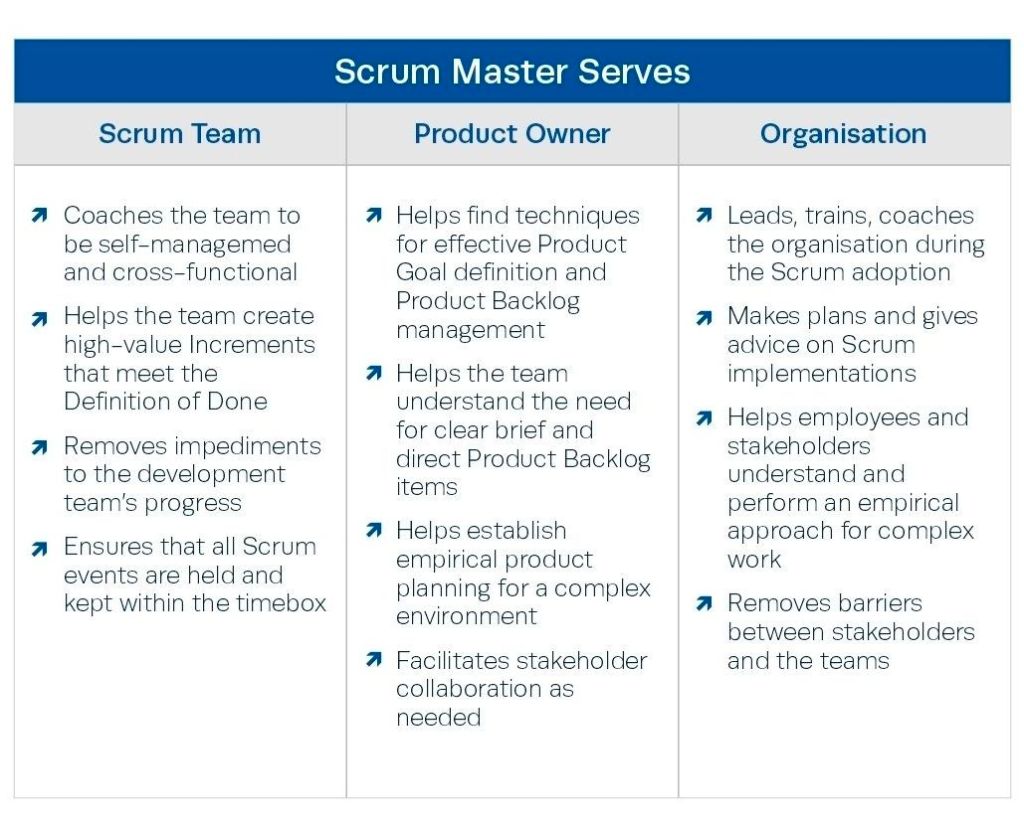
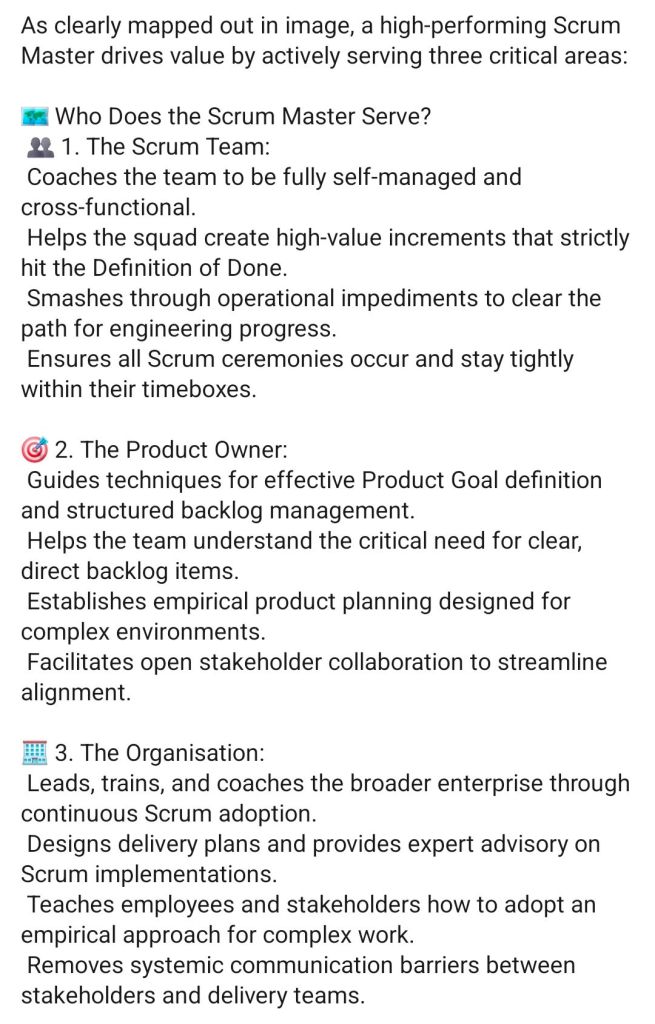
Scrum Master drives value by serving 3 critical areas

Scrum Master drives value by serving 3 critical areas
Agile Scrum Master drives value by serving three critical areas
Scrum Master drives value by
serving 3 critical areas

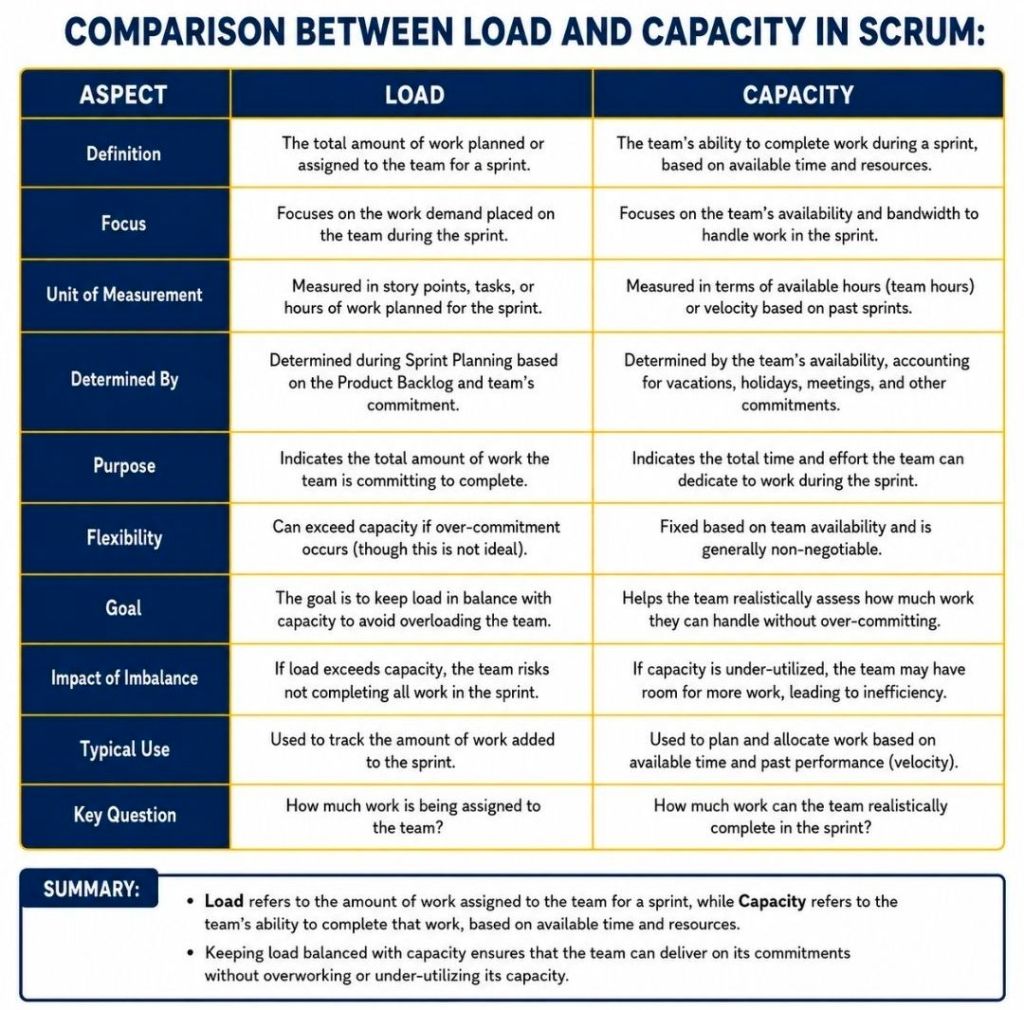
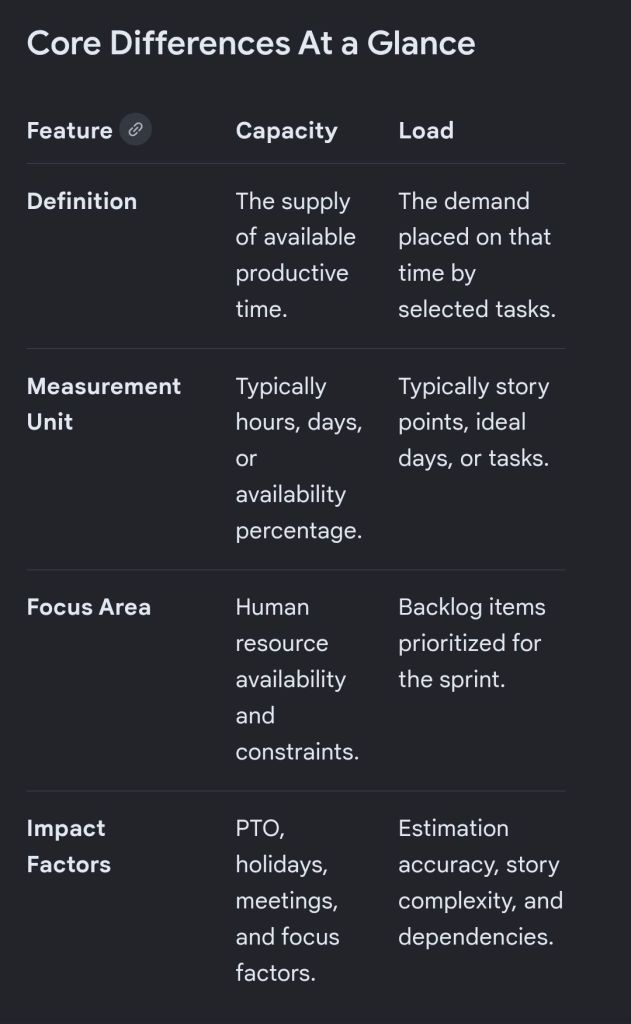
Comparison Between Load and Capacity in Agile Scrum

In Scrum, capacity represents the total amount of available work time a team has for an upcoming sprint, while load is the actual amount of work the team pulls into that sprint.

1 Comparison Between Load and Capacity in Agile Scrum
2 Comparison Between Load and Capacity in Agile Scrum
Comparison Between Load
& Capacity in Scrum

Understanding Capacity

Capacity acts as your ceiling. It is a forward-looking calculation performed right before sprint planning. It accounts for the reality of the upcoming calendar cycle.

  • To find a team’s capacity, you multiply total working days by the number of team members.
  • You then subtract non-productive time like public holidays, planned vacation days, and standard company meetings.
  • Finally, you apply a focus factor (typically around 70% to 80%) to account for daily distractions and context switching.

Understanding Load

Load represents the weight of the commitments made by the developers. It is the cumulative volume of user stories and tasks that the team intends to deliver during the sprint.

  • Load is entirely determined by how the team estimates the product backlog items pulled into the sprint.
  • Unlike capacity (which is restricted by time), load can theoretically be pushed to any level, though overloading creates major delivery risks.

Balancing the Relationship

The ultimate goal of a Scrum Master is to help the team balance load against capacity to maintain a sustainable pace.

  • The Safe Zone: Best practices dictate keeping your load at 10% to 20% below your absolute capacity. This visual buffer creates room for unexpected blockers or minor illness.
  • The Danger Zone (Overcommitment): An exact match where load equals capacity is considered an anti-pattern in Agile frameworks. It strips the team of flexibility, spikes burnout, encourages poor-quality code, and almost always leads to missed sprint goals.

Comparison Between Load & Capacity in Agile Scrum

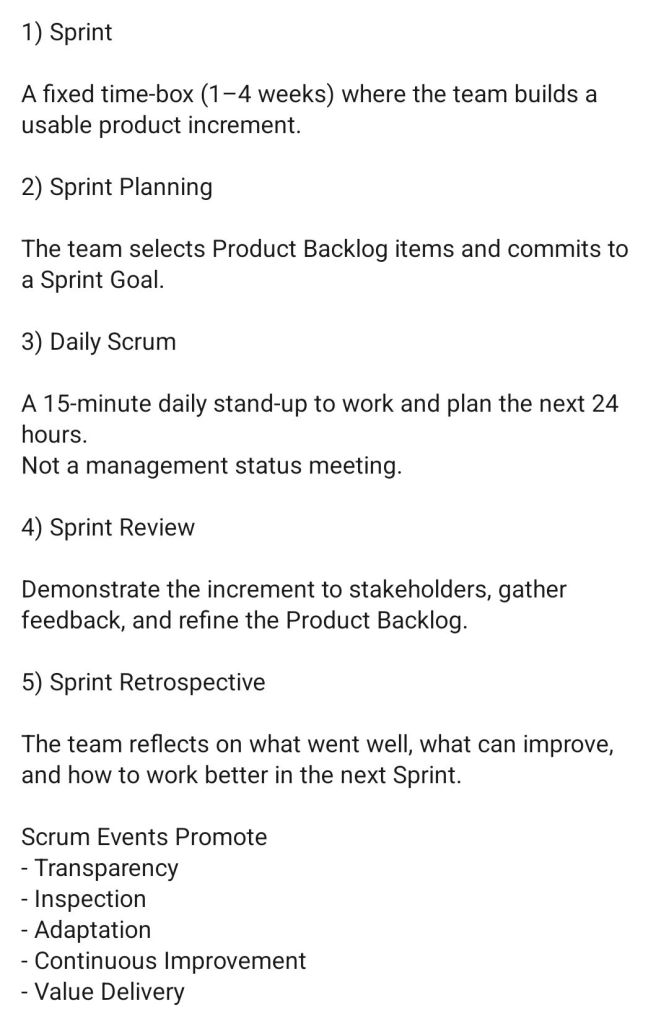
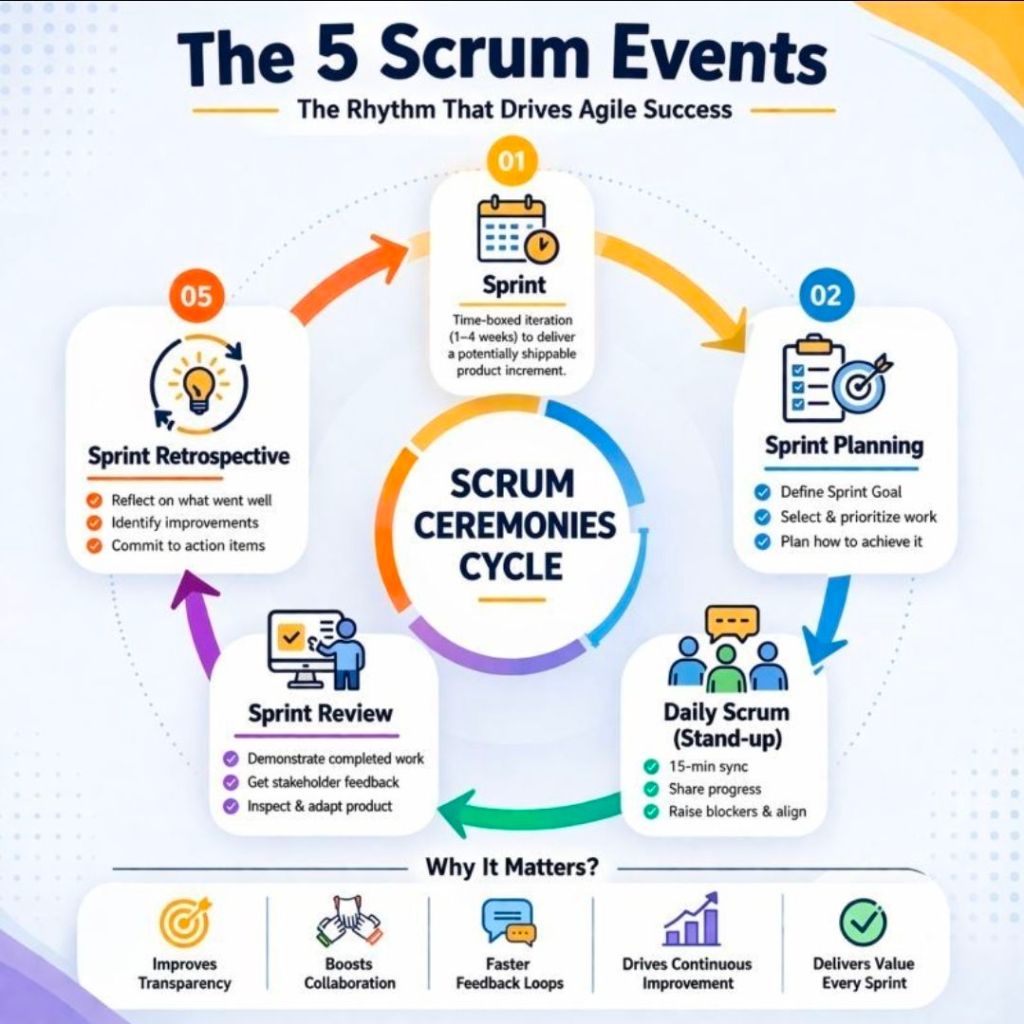
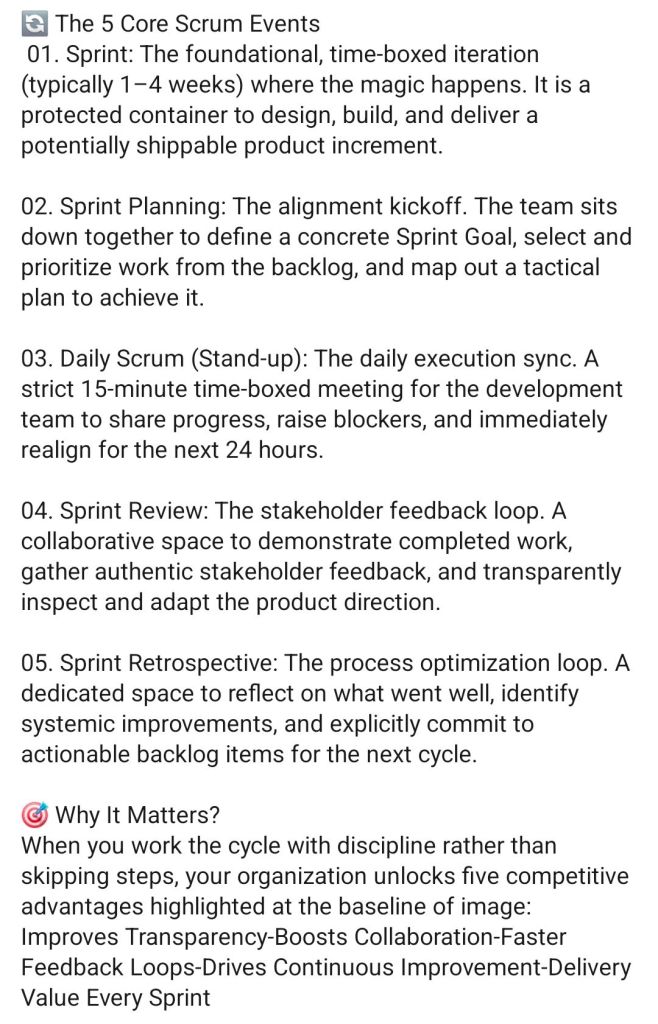
Agile, the 5 Scrum Events

Agile the 5 Scrum Events
the 5 Scrum Events

Agile Scrum Definition of Done DOD

Agile Scrum Definition of Done DOD

The Definition of Done (DoD) in Agile Scrum is a shared, team-wide checklist of the quality criteria every product backlog item must meet before it can be considered truly complete and releasable. It ensures consistent quality standards and prevents “almost done” work from accumulating as technical debt.

DoD vs. Acceptance Criteria

It is common to confuse the DoD with Acceptance Criteria, but they serve different purposes:

  • Definition of Done: Applies to all product backlog items. It dictates the technical quality standards (e.g., code reviewed, tests passed) required to be releasable.
  • Acceptance Criteria: Specific to an individual user story. It details the unique functional behaviors and business requirements needed to satisfy the user.

Typical DoD Checklist

While the DoD evolves as the team matures, a standard software development checklist often includes:

  • Code written and passes static analysis checks
  • Peer code review completed (Pull Request approved)
  • All unit and automated acceptance tests are written and passing
  • Security and performance checks completed
  • Meets accessibility standards (e.g., WCAG)
  • All necessary documentation (API, release notes, user guides) is updated
  • Deployed to a staging/testing environment

Why the DoD Matters

  • Transparency: Everyone—from developers to stakeholders—knows exactly what “done” means, removing ambiguity.
  • Quality Assurance: Establishes a minimum quality threshold, reducing bugs and future rework.
  • Releasability: Ensures the product increment is genuinely usable and ready to be shipped to end-users.