

Oracle Forms triggers are event-handlers written in PL/SQL (originally a proprietary step-based language) that execute in response to specific events within an application, such as mouse clicks, data entry, or database transactions. They allow developers to augment or replace default processing behavior.
My final year Higher National Diploma project in Oracle SQL forms.
Historical Timeline of Oracle Forms & Triggers
The evolution of Oracle Forms is defined by its transition from character-mode terminals to graphical user interfaces (GUI) and eventually to web-based and cloud architectures.
Era 1: The Character Mode & Macro Era (1979 – 1980s)
In this era, applications were designed for text-only terminals like the VT220. Logic was primitive and lacked the structural flow of modern programming.
- 1979 – Interactive Application Facility (IAF): The earliest form of the tool, consisting of a compiler (IAG) and a runtime interpreter (IAP).
- 1984 – FastForms / SQL*Forms 2.0: Renamed during the Oracle v4/v5 database era.
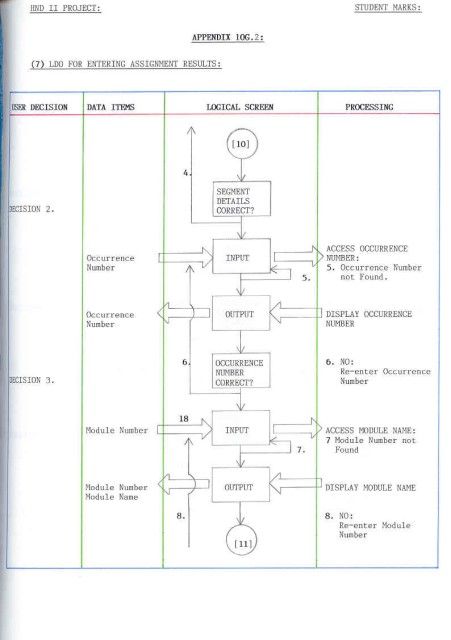
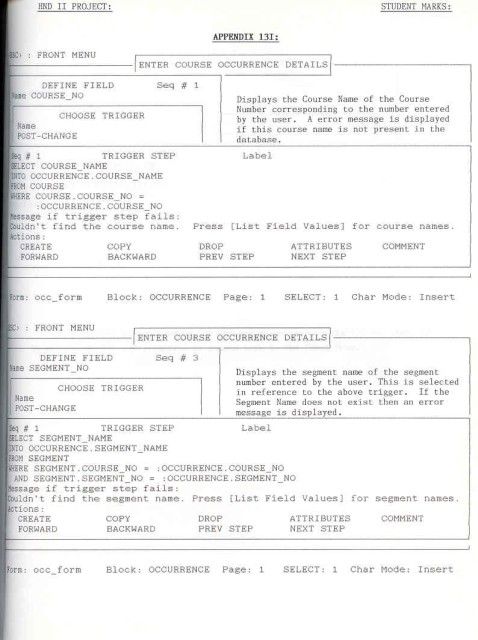
- Trigger Detail: Triggers did not use PL/SQL. They used a proprietary language based on trigger steps. To achieve logic like an
IFstatement, developers had to jump between steps based on the success or failure of a SQL statement.
- Trigger Detail: Triggers did not use PL/SQL. They used a proprietary language based on trigger steps. To achieve logic like an
- 1987 – SQL*Forms 2.3: A significant improvement that introduced procedural capabilities via
EXEMACRO CASEfor more complex logic.
Era 2: The PL/SQL & GUI Revolution (Late 1980s – 1990s)
This period marked the shift toward modern programming standards and the Windows operating system.
- 1988 – SQL*Forms 3.0: The first version to support PL/SQL within triggers. This replaced the old step-based triggers with block-structured code.
- 1993 – Oracle Forms 4.0: The first true GUI-based version, supporting checkboxes, radio groups, and mouse-based interactions.
- 1994 – Oracle Forms 4.5: A “quantum leap” in the product’s history.
- Trigger Detail: Introduced GUI-based triggers (e.g.,
WHEN-MOUSE-CLICK) and a modern IDE with an Object Navigator and Code Editor.
- Trigger Detail: Introduced GUI-based triggers (e.g.,
Era 3: The Web & Internet Era (Late 1990s – 2010s)
As the internet grew, Oracle pivoted to a three-tier architecture where forms ran in web browsers via Java.
- 1999 – Oracle Forms 6i: The ‘i’ stood for Internet. It introduced the Forms Server, allowing forms to run in a browser using a Java applet.
- 2002 – Oracle Forms 9i: Officially dropped support for client-server and character-mode deployment. Triggers began to support Java integration via imported Java classes.
- 2004 – Oracle Forms 10g: Integrated more deeply with J2EE and web services.
- 2009 – Oracle Forms 11g: Introduced external events and JavaScript support, allowing triggers to interact with web-based elements.
Era 4: Modern Cloud & Standalone Era (2015 – Present)
The current focus is on maintaining legacy reliability while adapting to modern infrastructure without a browser dependency.
- 2015 – Oracle Forms 12c: Introduced Java Web Start (JWS) and standalone modes, allowing applications to run without a parent browser.
- 2023 – Oracle Forms 12.2.1.19: Released with features like automatic language detection and browser-less launching (FSAL).
- 2024 – Oracle Forms 14.1.2: The latest stable release (skipping version 13), featuring modernized widgets and support for REST data sources.
- 2025/2026 – Transition Period: Long-time product advocates have left Oracle, signaling a shift toward sustaining mode where users are encouraged to modernize toward Oracle APEX.
Oracle Forms SQL triggers, event-handlers historical timeline by era
 PROject Templates